TL;DR
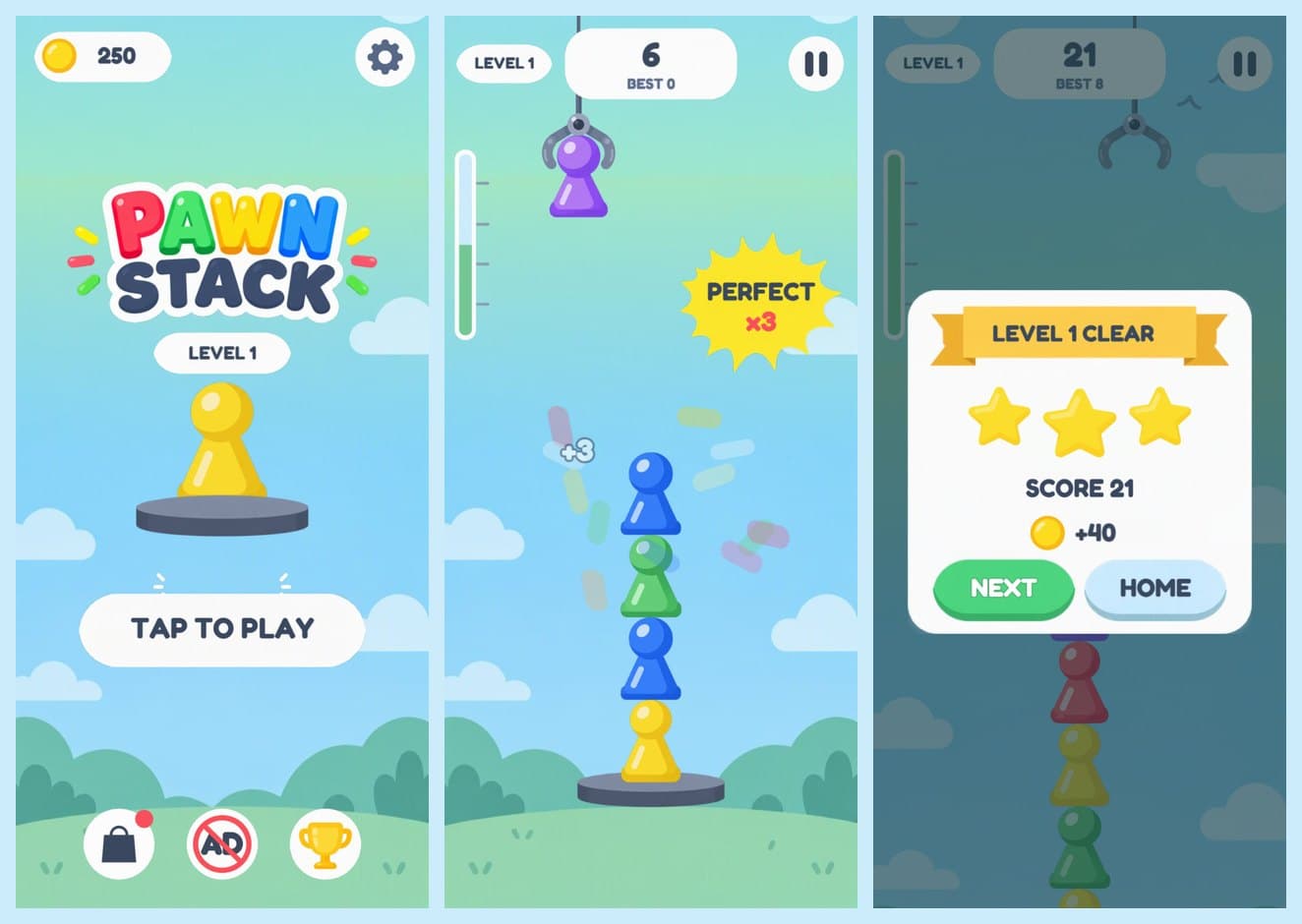
- One spec, one folder of art, one agent. Claude Code built Pawn Stack in Cocos Creator 3.8.8: 15 screens, levels, store, daily reward, Box2D physics, portrait on phones and a phone-shaped frame on desktop. 957 lines of TypeScript.
- 3 hours 43 minutes to the first deployable build, $12.62 in tokens (API-equivalent), $15.02 after the full scorecard. For about 2 hours of that, Cocos was building or stuck, most of it in three hung builds.
- The bugs that mattered were found by looking, not by tests. The tests passed on a game drawn tiny on desktop, and on a button that said "REVNE".
- Then I played it, and sent it back: "it doesn't look fit, assets not in each other, game too hard." All 16 checks were green. One more pass fixed it in about 35 minutes and $3.92 more.
The last post ended with cut sprites, a design sheet and an HTML mock. This one puts them in an engine.
The plan has two parts. First, a paid setup: Claude Code on Opus. Then the same job for free tools. To make that fair, everything starts from one frozen spec: a single Markdown file plus the art folder. No chat history, no earlier code. Whatever a tool gets, every tool gets.
Step 1: The Spec Before the Code
Before any Cocos code, the agent wrote SPEC.md and I froze it in git. It holds everything a tool needs and nothing it doesn't:
- The art: 66 sprites and the font, with sizes and what each one is for.
- 9-slice borders for every stretchable sprite, plus the scale rule from the last post (corners must be drawn smaller than source size, or they smear).
- Rules with exact numbers: swing speed, the 6 px perfect window, points, coins, the daily streak.
- Physics: the pawn's collider shape and the lessons from the web prototype, like "only the newest pawn simulates".
- 15 screens, from splash to rotate-your-phone.
- A 16-item acceptance checklist.
"Levels" was the one open question. Pawn Stack is endless, so the agent read it as target heights: the meter fills to the target, and you get 1 to 3 stars. The art already had a meter and stars that the prototype never used.
Anything the build taught us later went into a journal, not back into the spec. The free tools will get the same spec, with the same holes.
Step 2: Cocos From the Command Line
The project started from Cocos's own "Empty 2D" template. The scene is empty. One script builds both cameras, the canvas and every screen in code. Scene files are big JSON blobs that an agent edits badly; code can be reviewed.
Then the agent built it headless:
CocosCreator.exe --project game --build "platform=web-mobile;debug=false"
This is where the afternoon went.
- A build that waited forever. The script read the scene ID with Node's
require(), which can't parse a.metafile. Empty ID, no error, a build that never ends. - 27 minutes stuck on "device-list". At startup, Cocos asks the internet for a list of devices. I had a trick from another project that blocks its DNS so the request fails fast. On this PC it made things worse: the network service crashed and the request hung. Without the trick, the same step took 3.5 minutes.
- A log watcher killed a build. On Windows, tailing Cocos's log file locked it, and Cocos died with
EPERM.
Seven builds to the first deployable one. Cocos was building, or stuck, for about 2 hours of the 3 hours 43 minutes, measured from each build's start to its result. Three hung builds took 45, 29 and 29 minutes. Builds that worked took 2 to 9 minutes each. Some of the code was written while a build ran, so not all of it was dead time, but the three hangs were.
Step 3: The First Build Ran
The first build that finished just worked: splash, home, daily reward, gameplay, every popup, the store. Zero console errors.
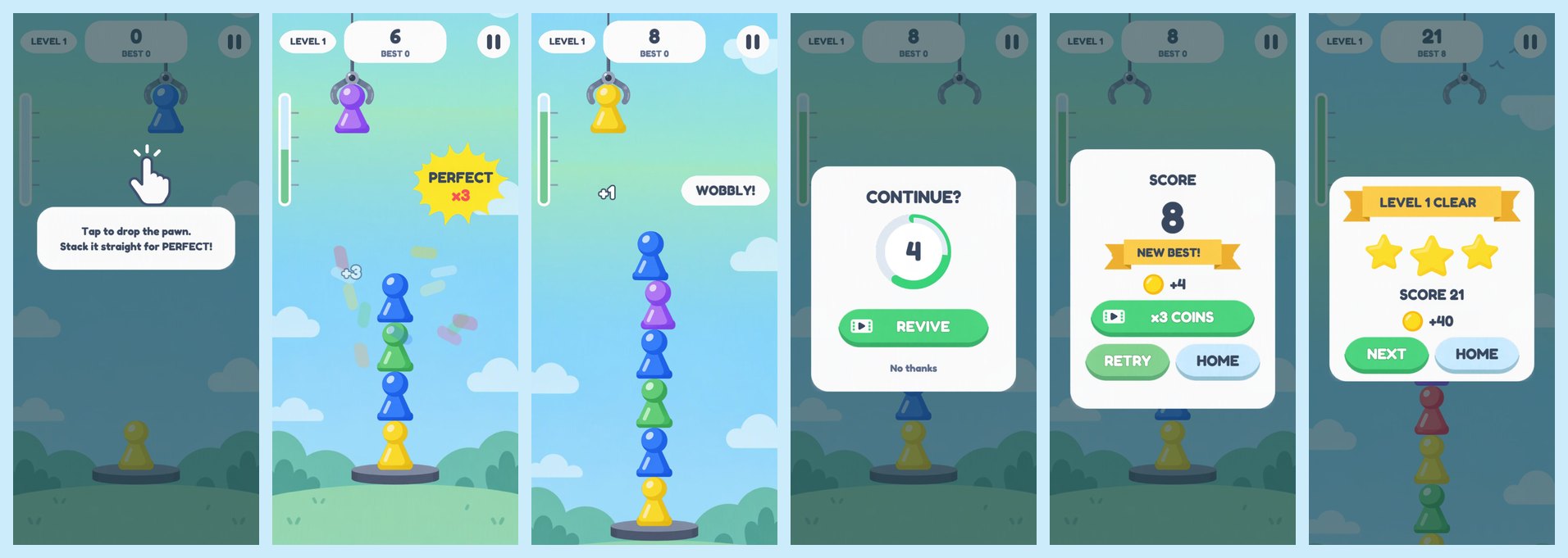
The agent wrote a play-test that drives the real build in a headless browser at phone size (390×844) and desktop size (1920×1080). It taps TAP TO PLAY like a player, drops pawns at exact offsets, and saves a screenshot of every screen:
- 5 perfects → combo x5, ring and confetti.
- 10 px and −12 px misses hold. A 40 px miss topples the tower.
- Revive brings back the whole tower.
- Level 1 clears with 3 stars, and NEXT starts level 2.
- Every upright pawn is drawn exactly on its collider: 0 px between the sprite's box and Box2D's own box. In the web prototype the sprites were drawn 28 px off their colliders while every number looked right. This check exists because of that bug.
Physics came out close to the spec. Pawns hold up to 14 px off-centre and fall at 16, the same ±15 px window as the prototype. The soft middle the spec asked for ("14 wobbles, 16 teeters") isn't there: in Box2D it's a cliff. So the agent added a short rock animation on off-centre landings, so you feel the wobble even though physics already decided the pawn stays. (Pass 2, below, replaced the cliff.)
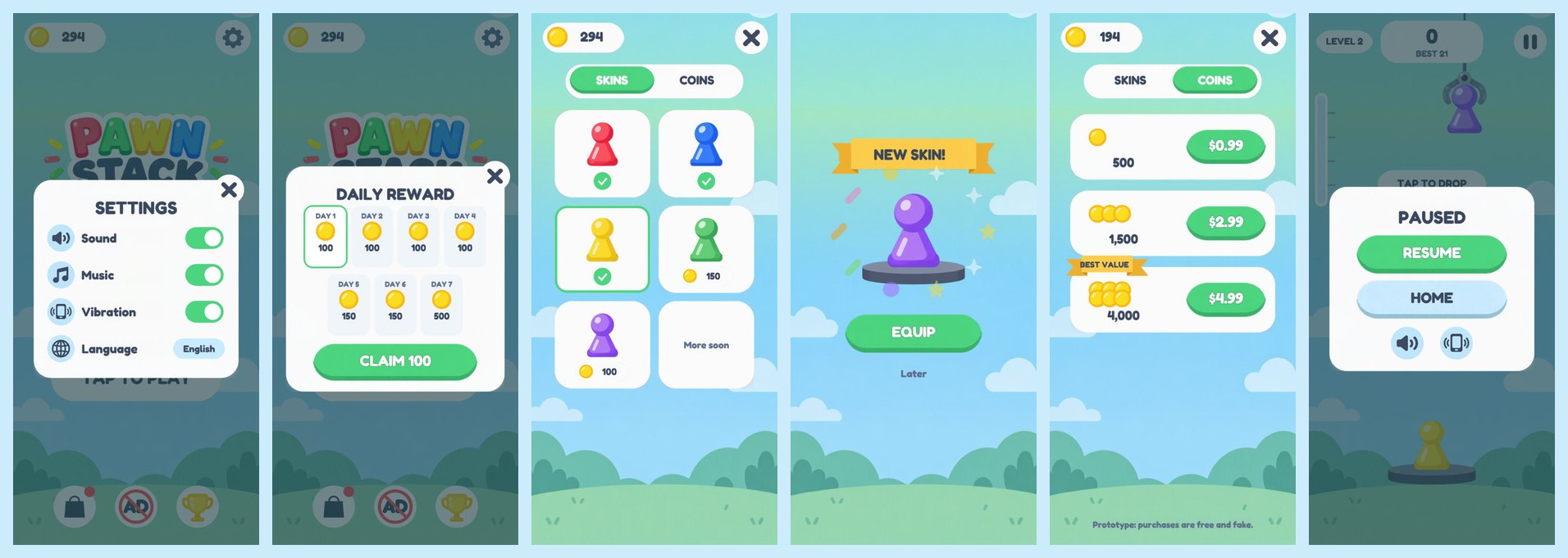
Step 4: The Bugs the Tests Didn't See
Every test number was green. Then we looked at the screenshots.
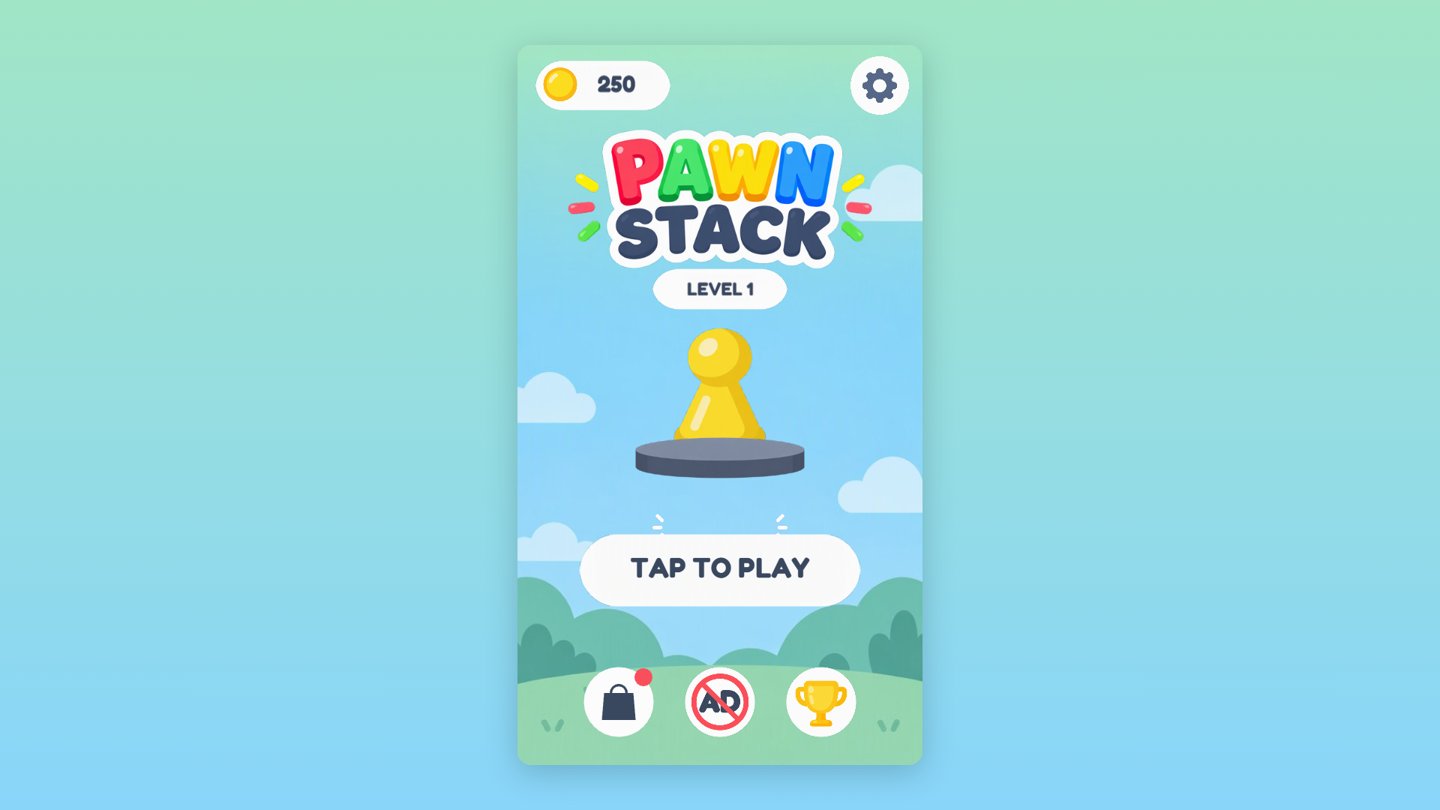
Desktop was drawn tiny. The page frame was right, a 540×960 phone shape in the middle of the screen. But the game inside it was drawn for the whole browser window and squeezed. Cocos has a setting called exactFitScreen, on by default, that sizes the game to the window and ignores the page around it. The HTML attribute that looks like it controls this does nothing in 3.8. The real switch is in the built settings.json.
The REVIVE button said "REVNE".

This isn't a Cocos bug. Fredoka's own kerning pulls the V under the I at bold weight, and Chrome does it too with the original Google font. The agent's first font check passed because the image library it used doesn't apply kerning at all. The fix: turn off kerning in the game's copy of the font. The spec's copy still has it, which makes it a good test for the free tools.
And a few smaller ones, all found by eye:
- PERFECT badge, WOBBLY! and "+5" stacked on top of each other.
- "LEVEL 1" hidden behind the pawn on the home screen.
- A second pedestal showing through the menus.
- The engine's black COCOS splash before ours.
- A real gameplay bug: the "fall → results" timer from the last run could fire after RETRY and end the new run at score 0.
The last one is the only one a test could have caught, and the test caught it. Only on desktop, though, where frames were slower.
What It Cost
From Claude Code's own usage log, priced at the API list price for Opus 5.5. I'm on a subscription, so this is what it would cost on the API, not what I paid:
- Output (code, docs, reasoning): 118 K tokens, $2.36
- Cache reads: 39.3 M tokens, $7.87
- Cache writes: 298 K tokens, $2.39
- Total to the first deployable build: $12.62
- Total after the scorecard and deploy: $15.02 (48.2 M tokens, 167 model responses)
- Images: $0. All the art came from the last post, which cost about $4.50
- Pass 2 (fit and difficulty): $3.92 (8.5 M tokens, about 35 minutes, two builds of under a minute each, because Cocos had already imported the art)
Most of the bill is cache reads: each turn re-reads the whole conversation. Waiting for a build still costs turns, so slow tools cost money too, not only time.
Scoring It Like the Free Tools Will Be Scored
The play-test above uses hooks inside our own code: it reads the claw position and calls functions. A free tool's build won't have those hooks. So the five checks the hooks didn't prove were run again from the outside: real taps at screen positions, page reloads, screenshots.
- Daily reward: claimed, reopened, page reloaded, reopened. It says "Come back tomorrow".
- Settings: sound and music off, reload, still off. Counting audio oscillators from outside the game: 0 with sound off, 19 with it on.
- Store: bought purple, tapped EQUIP, started a run. The base pawn is purple.
- Revive: tapped the REVIVE button. The tower came back.
- Phone turned sideways: the rotate message shows and the game pauses.
16 of 16 checks pass. Each tool gets the same scorecard.
Then I Played It
I opened the live link on my phone, played a few rounds and sent it back with one line: "it doesn't look fit, assets not in each other, game too hard."
All 16 checks were green. Each of those three complaints was real.
"Assets not in each other." The height meter's green fill was hanging outside its tube. Look at the cover of the first version and it's right there. The cause is a Cocos default: on import, Cocos trims the transparent edge off every image. The game draws each sprite at a fixed size, so the trimmed image gets stretched to fill the box. The meter fill is 94 px wide, but only 40 px of it is green. Trimmed and stretched, it came out more than twice as wide as the tube. The pawns were affected too: each colour has a different transparent edge, so each colour was drawn at a slightly different width.
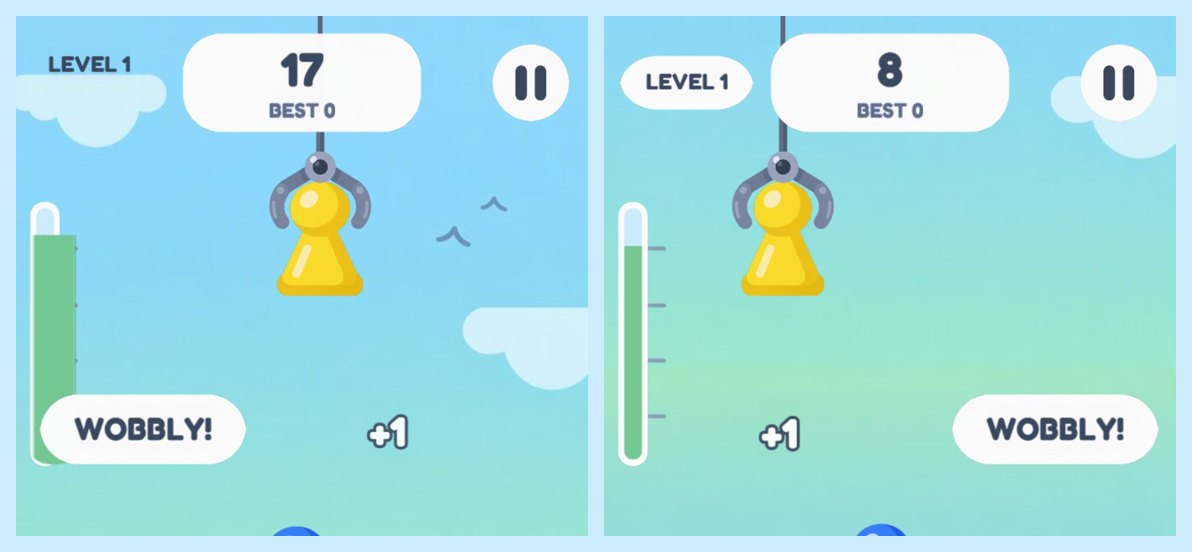
The collider check passed all along. It checks that the sprite's box sits on the physics box, and the box was right. What was drawn inside the box was wrong. The fix is one setting per image (trimType: none), but the first try, a flag in code, only half worked: the meter is a "filled" sprite, and those ignore the flag.
A new check went through five phone sizes, from 360×640 to 412×915, and found the overlaps: PERFECT and WOBBLY! drawn on top of the meter, WOBBLY! drawn over the pause card, and the tutorial hand covering the "TAP TO DROP" hint.
"Game too hard." The agent measured it before changing anything:
- At the start, the claw crossed the tower at about 105 px a second. Box2D holds a pawn up to 15 px off-centre, so you had about 270 ms to tap, and 115 ms for a PERFECT.
- The claw sped up with the score, and combos add points fast. After 5 perfects you had 150 ms to land a pawn and 65 ms for a PERFECT. The better you played, the faster it got harder.
The changes:
- A slower claw that speeds up with pawns placed, not score.
- The PERFECT window went from ±6 px to ±9 px.
- Any pawn within 22 px of the centre now always lands and is pulled partway back to the centre, replacing Box2D's 15 px cliff.
- Level 1 needs 6 pawns, not 8.
Now you have about 670 ms to land a pawn at the start and 270 ms for a PERFECT.
The spec the free tools get still has the old numbers, on purpose. A tool that follows it exactly will ship a game that's too hard, and so will the Cocos default that stretches its art. The scorecard now has a line for each.
Play It
Play Pawn Stack (Claude Code's build). On a phone it fills the screen in portrait. On a computer it plays in a phone-shaped frame.
The game has its own address now, and the path names the tool that built it. The free tools' builds will go next to it on the same address, so you can play them side by side.
Next: The Same Spec, Free Tools
The spec, the art and the checklist are now one zip. Next post: the same zip, the same prompt ("Build this game exactly as SPEC.md describes. Work until every item in section 12 passes."), different tools. Same 16 checks for all of them.
What I'll watch for:
- Does the tool get Cocos to build at all from the command line?
- Do the sprites sit on their colliders?
- Does anyone notice "REVNE"?
- Does the meter fill sit inside its tube? Can a first-time player clear level 1?
Get the free-tools comparison in your feed
I run tests like this one on AI and game dev, and share the real numbers and the mistakes. Subscribe to the newsletter on LinkedIn.
Subscribe on LinkedIn →
Rather talk it through with other devs first? Join our GameDev AI community.