TL;DR
- I tested three image models (GPT-Image-2, 2.5-flare, 2.5-sunburst) on four jobs: a spinning coin, a crow sword slash, cutting the crow into layers, and pulling the art out of a game mock-up. 153 generations, all measured.
- They draw a thing. They don't remember the sequence it belongs to. A pose, a body part or a single asset works. "Frame 3 of 8" of a spin fails in all three models.
- Frame-by-frame animation keeps the character but drifts in size - the crow's head changed size by up to 27% between frames. Even after lining the frames up to the beak and feet, all three models still jitter. None of the crow animations is usable as it is.
- What worked better: cut the character into layers once (7 calls), then animate by moving the layers. Zero drift, zero extra calls per animation - but stiff, so use a real tool like Spine for the motion.
- From a mock-up, all 60 of 60 assets were usable, and the rebuilt screen gets about two-thirds of the way to a perfect copy. The picture you give the model beats the prompt: a screen full of faces gets you faces.
- The model ranking changed in every test. None of the output is game-ready yet - it's a starting point for an artist, not a replacement.
Image models got really good at drawing a single game asset. One prompt, one nice-looking coin, transparent background, ready to drop into Unity.
So I wanted to check two things.
First: can they animate it? Not a video. The eight frames of a sprite animation - the thing a game actually needs - where every frame is the same object, same size, same place, just moved.
Second: if I give an AI a mock-up of a game screen, can it give me the art for that screen?
I ran four tests to find out. Three models, identical prompts, 153 generations. And I measured everything, because "looks pretty good" is not a result.
Disclaimer First
One run per test. One coin, one crow, one mock-up. I'm still learning how to get the best out of these models, and some of what I call "failures" below might be my prompts and not the models. In one case I know it was my prompt, and I'll point it out when we get there.
So take the rankings with a grain of salt. The patterns are what I trust.
The Setup
Three models, all on the same Azure endpoint, so the only thing that changes is the model:
- GPT-Image-2 - the older one
- GPT-Image-2.5-flare - the fast variant
- GPT-Image-2.5-sunburst - the high-fidelity variant
For the first three tests the method is the same. I generate one base asset, then send that exact image to all three models through the edits endpoint, with byte-identical prompts. The image goes in, so the model changes the asset instead of re-imagining it from a description.
Then I measure. Pixel counts, not vibes.
Test 1: The Spinning Coin

The easiest case I could think of. A coin spinning in place, eight frames, 45° per frame.
The nice thing about a coin is that there's a math answer. A disc turning around its vertical axis gets narrower by the cosine of the angle, so the three-quarter frames should be exactly 0.707 of the full width. I don't have to argue about whether it looks right. I can measure it.
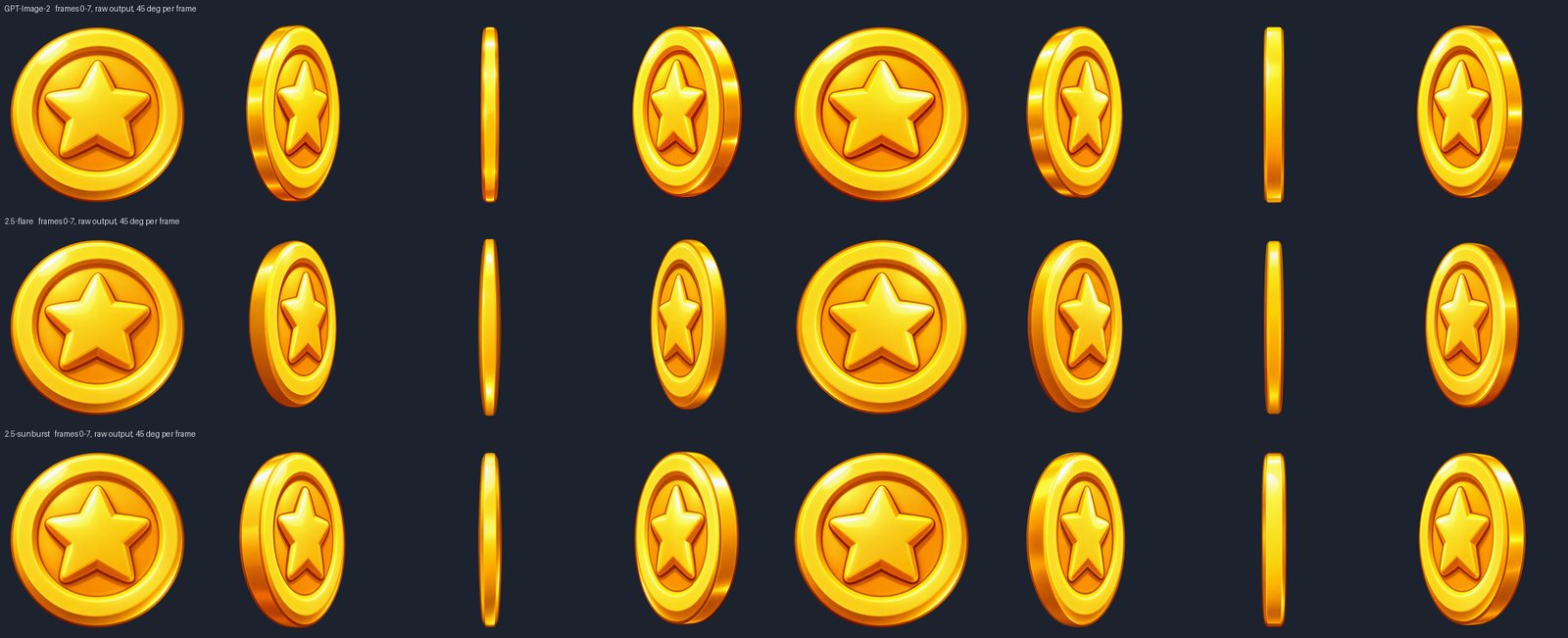
Here's what came back, one row per model:
And here's how it plays:



Look at frames 1, 3, 5 and 7 in any row. They all lean the same way. The edge band - the strip of gold you see when the coin turns - is on the left in every single one. That's why the GIFs rock back and forth instead of spinning.
That's wrong. Once a coin turns past edge-on, the band has to switch sides. I told every model which side, on every frame. All three ignored it.
Why It Failed
"45 degrees" and "135 degrees" look almost the same in a single picture. The only difference is which way the coin is turning, and that information doesn't exist in one frame. It only exists in the sequence.
The model doesn't have the sequence. Every call is a fresh start with one image. Asking for "frame 3 of 8" is asking it to know something that isn't in the input.
The Fix Was Fewer Calls, Not More
A coin is symmetric, and so is a five-pointed star. So the second half of the spin is just the first half mirrored. Not an approximation - that's the actual geometry.
Generate 0°, 45° and 90°. Flip them. You get all eight frames, and the back side is correct for free:
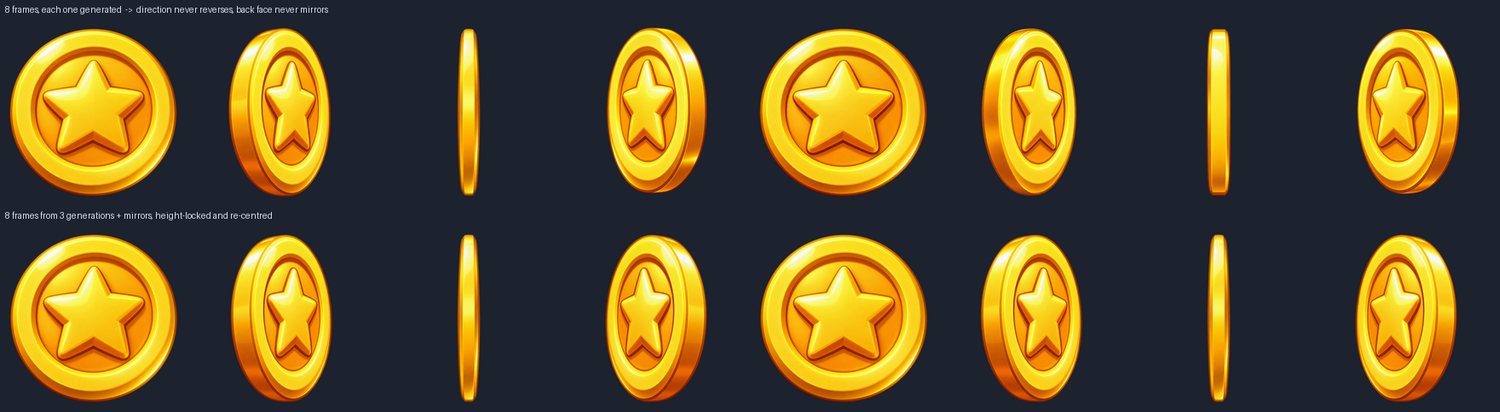


Two model calls instead of seven, and the jitter goes to zero, because the mirrored half is a pixel copy of a frame I already cleaned up.
On this test sunburst won every measure: half the wobble of the other two, and the coin's height held within 1.3%. Remember that, because it doesn't survive the next test.
Test 2: A Crow With a Sword
A coin is the easy case. So the next one was a chibi crow swordsman, Capybara Go style, doing an eight-frame sword slash.
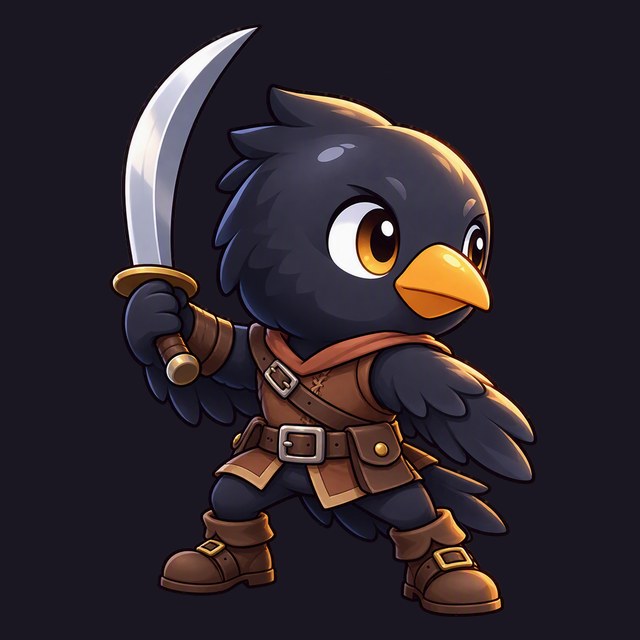
Same method. One approved crow, scaled down to 60% of the canvas so the sword wouldn't get cut off, and eight prompts: ready, wind-up, swing start, strike, follow-through, lowest point, recovery, settle.
Every prompt said the same thing about identity: same head, eyes, beak, leather gear and sword - only the pose changes. And no motion blur, no speed lines, no slash trail, no effects.
This Time It Worked
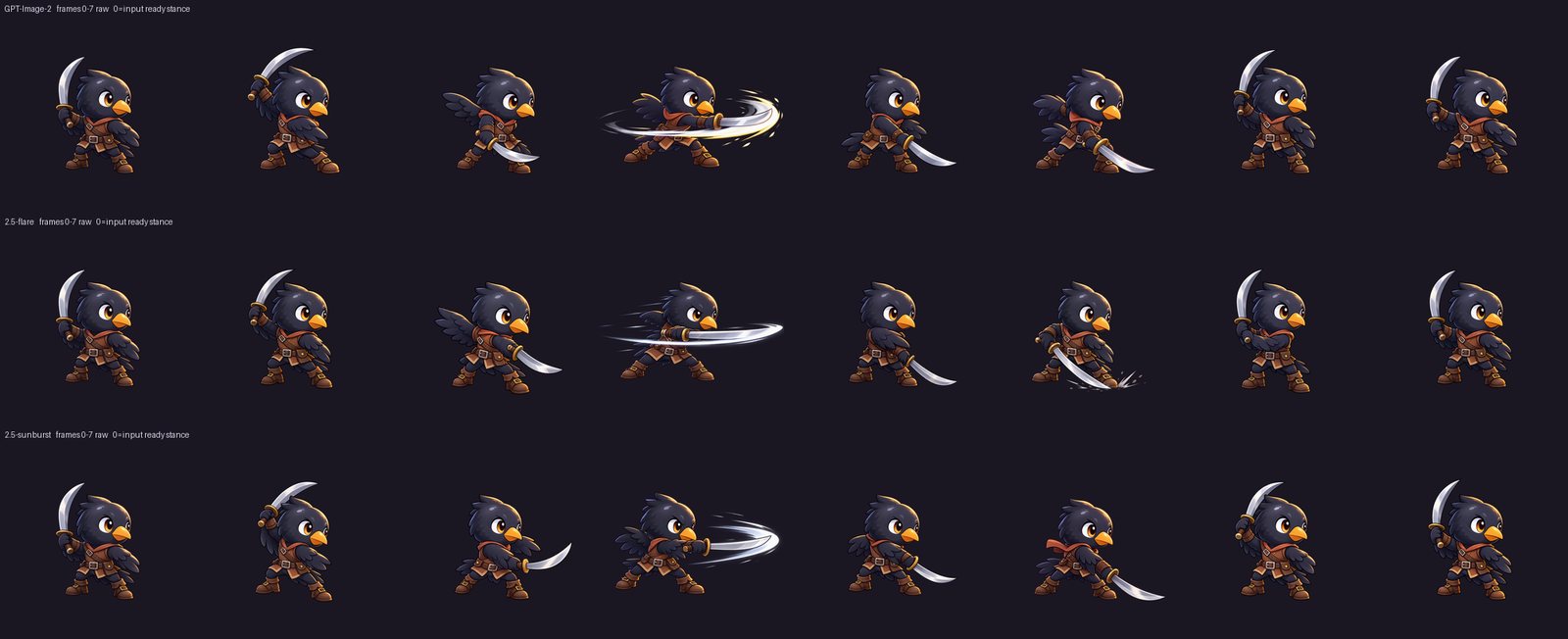
All eight beats, in order, in all three models. A wind-up looks like a wind-up.
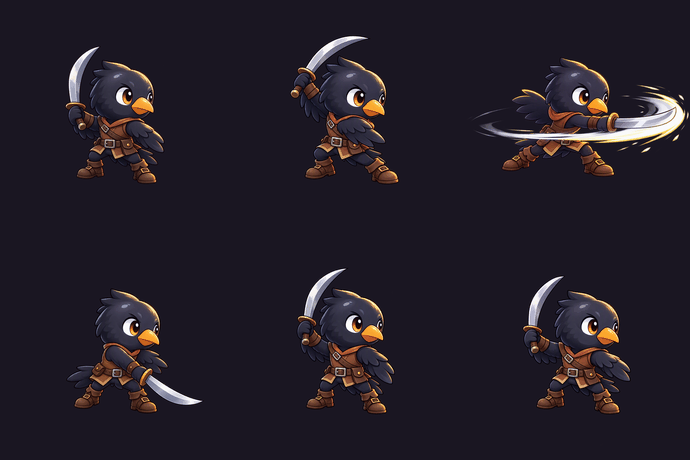
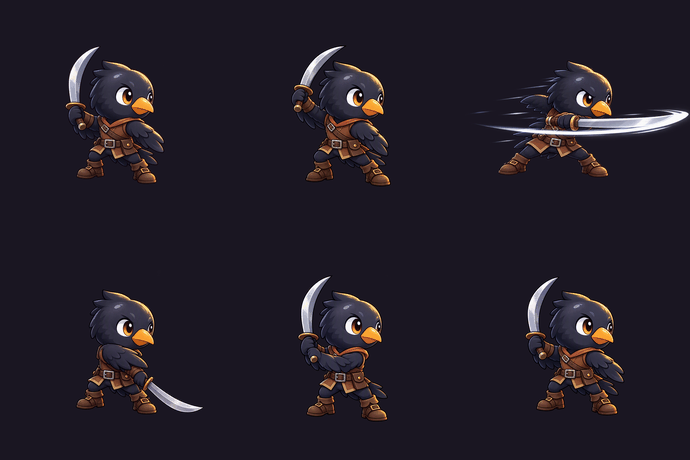
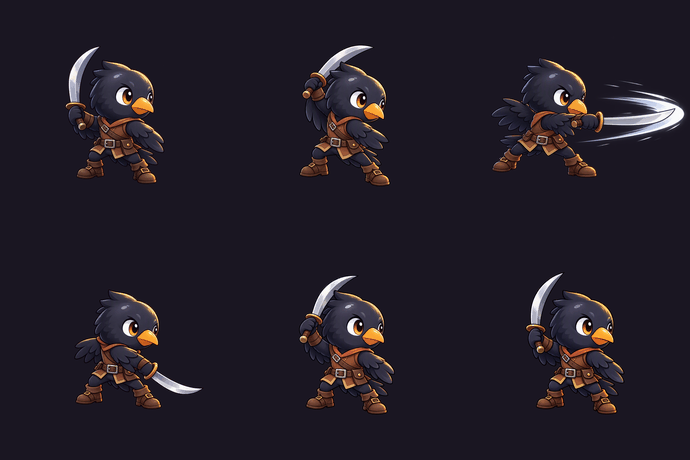
The clearest way to see the motion is an onion skin - all eight frames stacked on top of each other with the feet on one line:
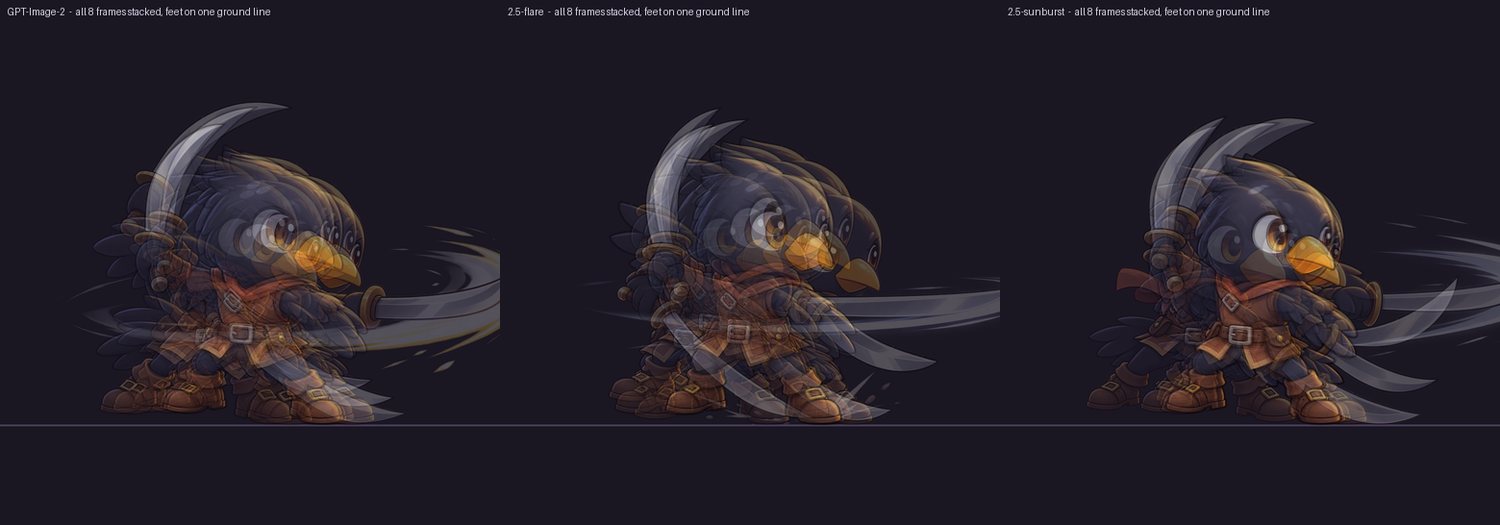
That's a real slash arc. The difference from the coin is simple: a pose is a picture. "The crow crouching with the sword at the bottom of its arc" is something you can draw without knowing what came before. "45 degrees into a turn" isn't.
But Look at the Heads
Watch the GIFs again and the crow's head keeps changing size. That's not acting. That's the model redrawing the crow at a different size every call.
I measured it with the beak - one orange shape that's in every frame and should never change size:
| GPT-Image-2 | 2.5-flare | 2.5-sunburst | |
|---|---|---|---|
| Head-size drift (worst frame) | 11.9% | 19.9% | 27.4% |
| Slash-trail glare added | +12.2 pp | +9.0 pp | +5.3 pp |
| Height drift, standing frames | 8.1% | 2.3% | 3.3% |
Three measures, three different winners. The model that swept the coin came last on head size here. If you take one practical thing from this post: don't carry a model ranking from one task to the next.
The identity held up really well, though. Across all 24 frames it's the same crow - same eye, same harness, same sword. The problems are size and placement, not character.
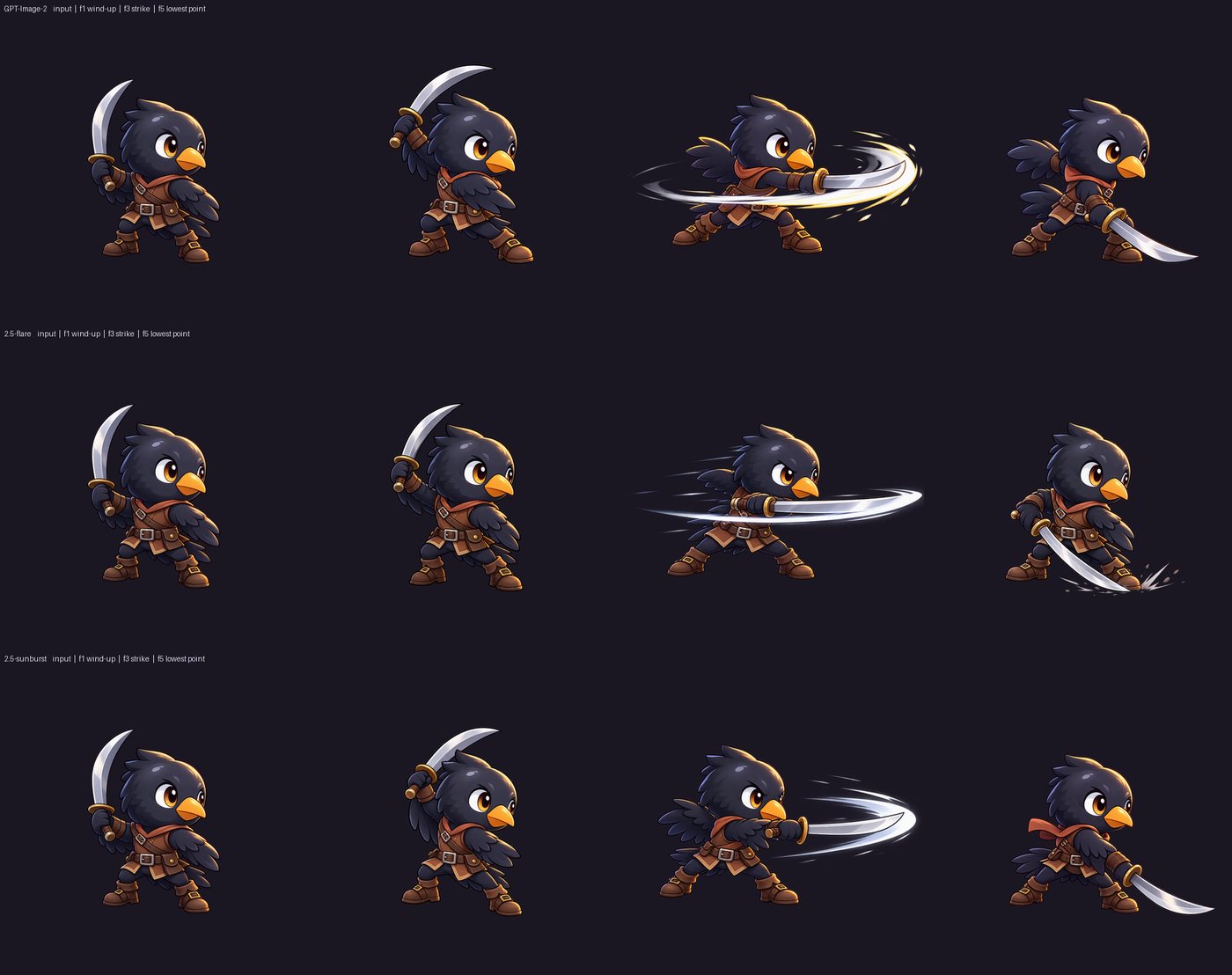
All Three Added the Trail Anyway
All three broke the "no effects" rule, on the exact same frame - the strike - by adding a slash trail. A cartoon sword at full swing comes with a trail in the training data, and writing "no trail" five different ways doesn't remove it.
When all three models disagree with your prompt in the same direction, it's not a prompt problem. It's a prior, and you won't argue it away.
Fixing It After the Fact
Size and placement can be fixed without generating anything new. Scale every frame so the beak matches the original, and pin the feet to one line:
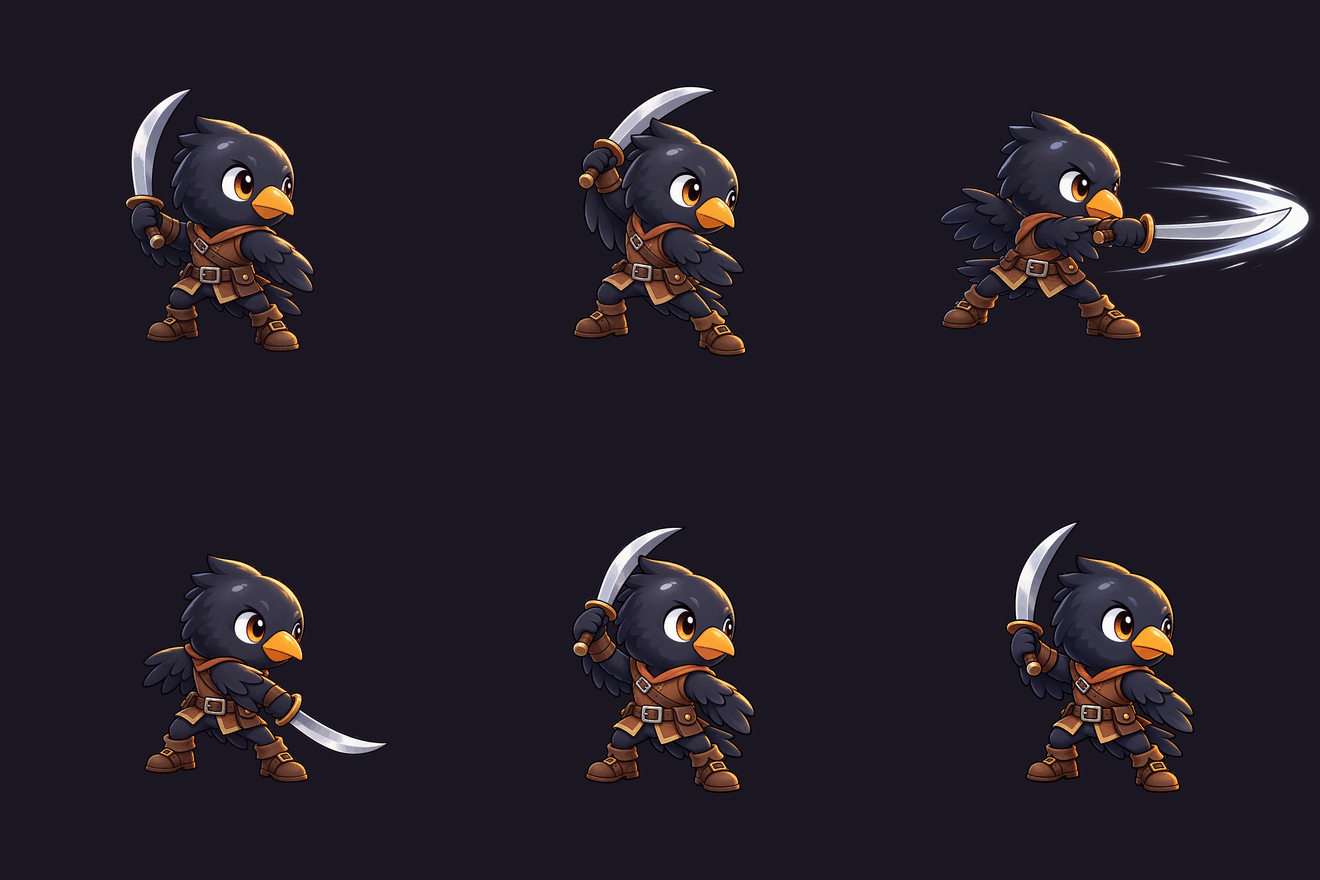
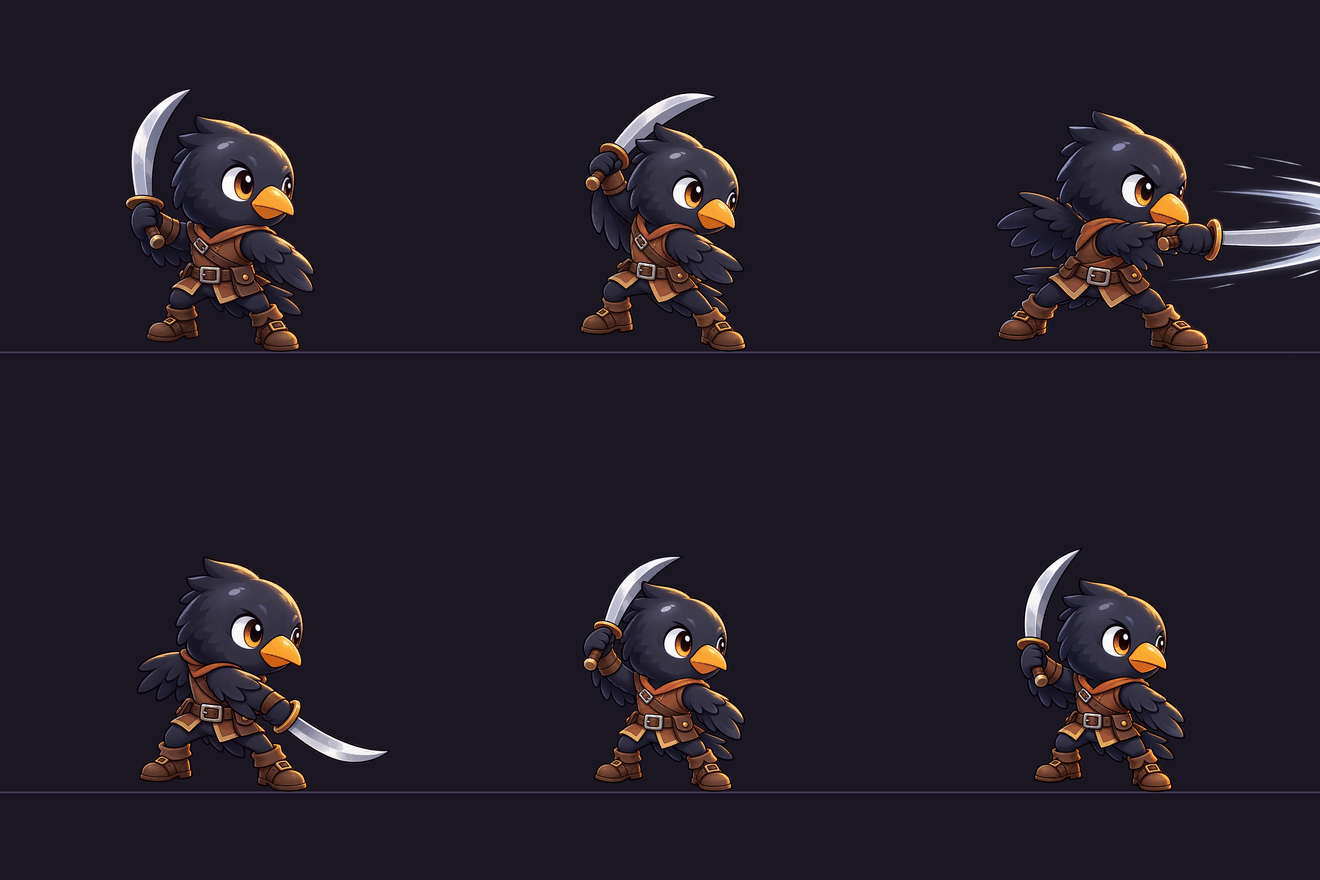
Same eight images. No new generations. More watchable - but still not good.
Even with the beak locked and the feet pinned to one line, all three models still look jittery. The outline, the gear and the sword shift a little from frame to frame, because each frame is still a fresh drawing. Lining the frames up removes the big jumps. It can't remove the small redraws. None of the crow animations from any of the three models is usable as it is.
The catch is that you need a landmark. The beak works because it's one saturated colour, visible in every frame, with a fixed real size. So pick the landmark when you design the character, not when you animate it.
Test 3: Stop Animating, Start Rigging
If the problem is that the model redraws the character every time, the answer is obvious in hindsight: don't let it redraw the character.
Cut the crow into layers once, then animate by moving the layers. I wrote a seven-layer plan - tail, far wing, legs, torso, head, sword wing, sword - and sent the same plan to all three models, one call per layer. The important part of the prompt wasn't the list. It was this:
Do not redraw. Do not re-centre. Do not resize.
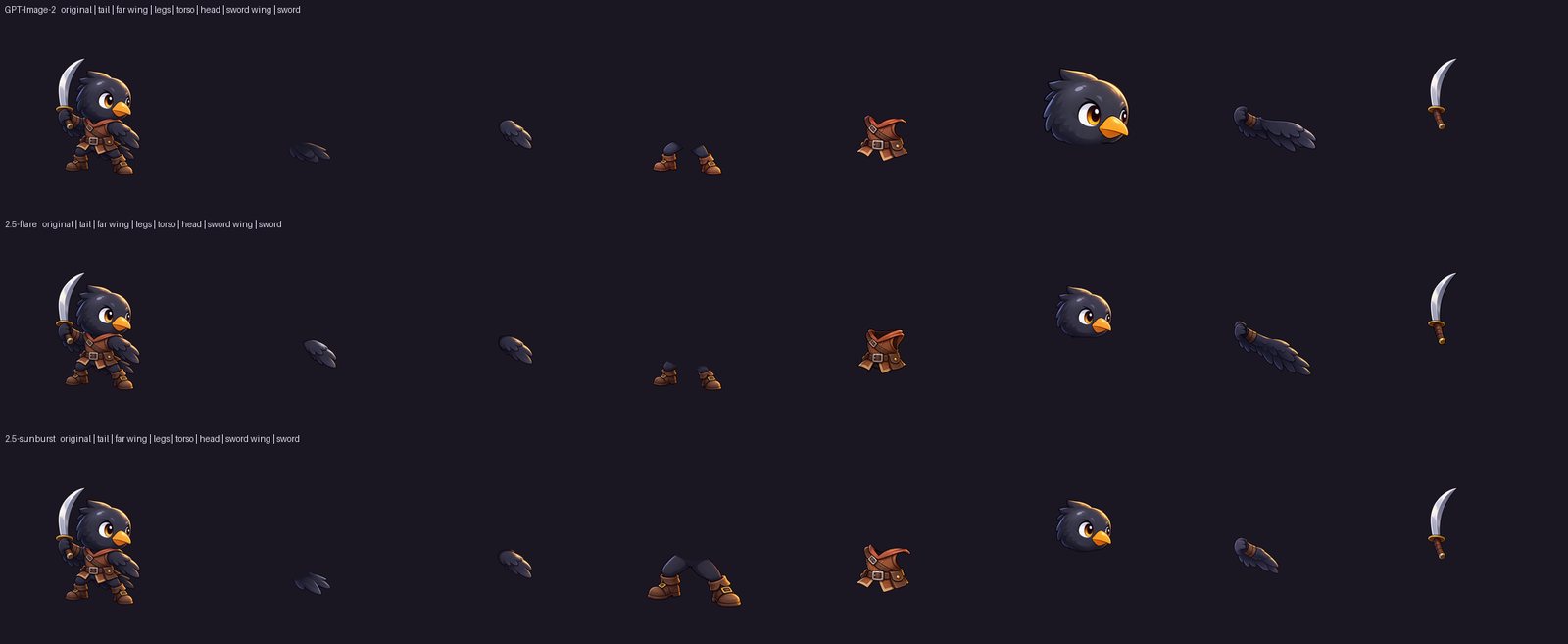
21 extractions, 21 recognisable parts. No empty results, and no layer that came back as the whole bird. Which fits: a part is something you can draw on its own, just like a pose.
Putting It Back Together
Layers are only a rig if they fit back together. So I stacked all seven and compared them with the original crow:
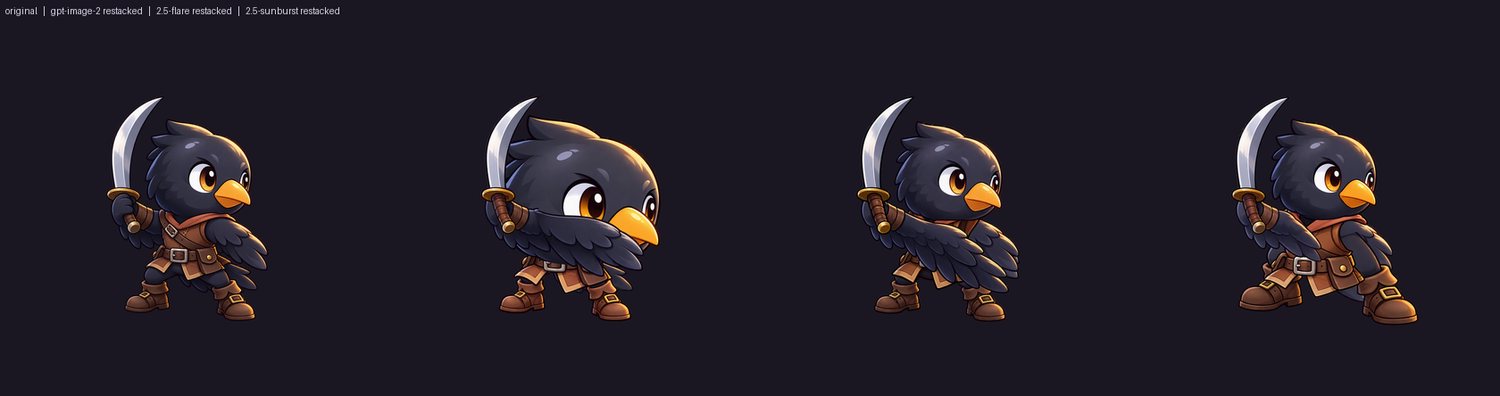
In the difference maps, red is extra and blue is missing:
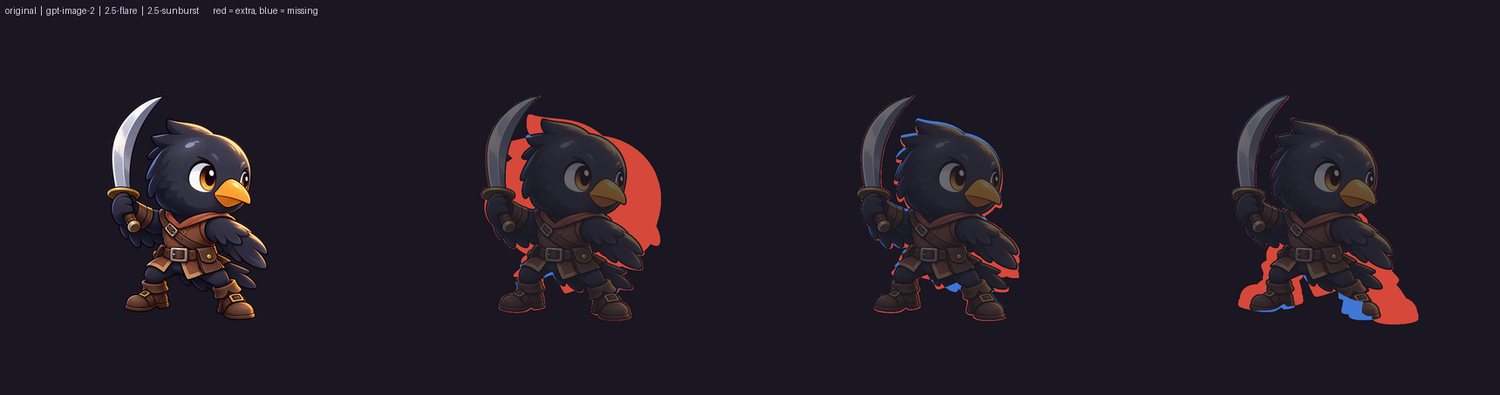
| GPT-Image-2 | 2.5-flare | 2.5-sunburst | |
|---|---|---|---|
| Restack overlap with the original | 80.1% | 94.3% | 85.3% |
| Colour difference | 36.6 | 26.9 | 23.0 |
| Worst layer out of place | 20.6% | 5.4% | 27.8% |
GPT-Image-2 returned the head at about double size - it drew a portrait instead of cutting out a part. Sunburst gave the crow boots a size too big. Flare nailed it.
And the layer that has to move is the one that is hardest to put back. Even flare, the best of the three, handed back the sword wing sitting too far forward - far enough that it buries the leather vest underneath and leaves only 24.3% of it showing. Cutting a part out is easy. Pinning it back exactly where it came from is pin the tail on the donkey: the model is blindfolded, spun around, and pointed at the character. A few pixels off is all it takes, and unlike the donkey, a wing pinned in the wrong place tears the shoulder open the moment the arm swings.
One thing I learned about measuring: I also tracked "how much of the original is covered", and GPT-Image-2 won it at 99.7% - because its huge head covers everything underneath. A metric that a bug can win is not a metric. I dropped it.
The Payoff
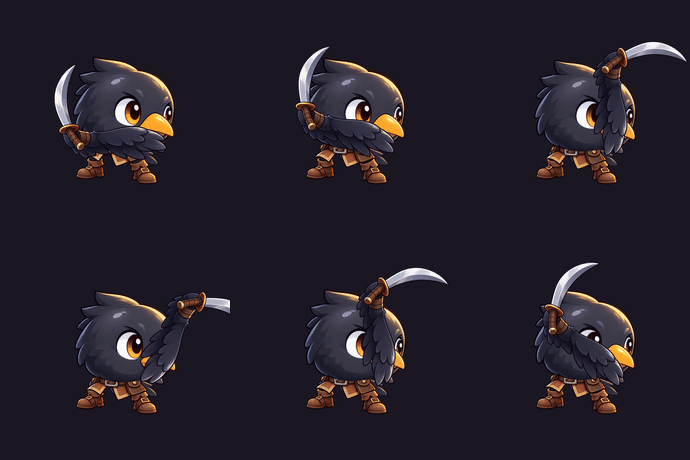
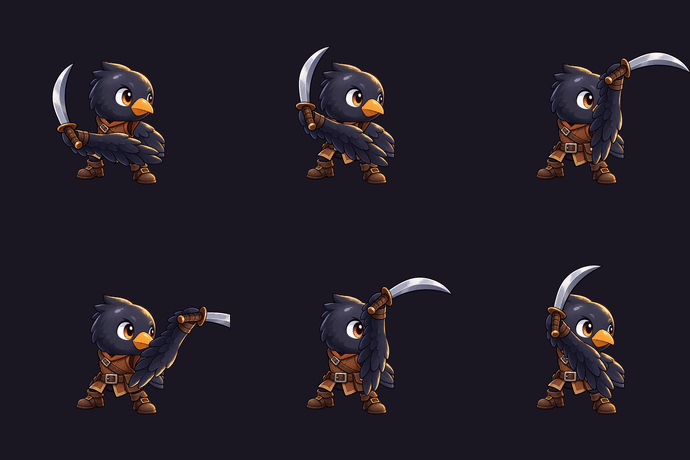
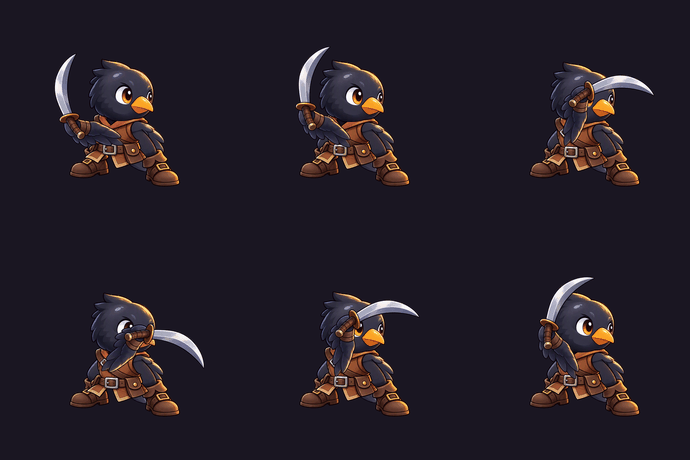
Take the seven layers, find the shoulder, and rotate the sword and wing around it while the body dips:

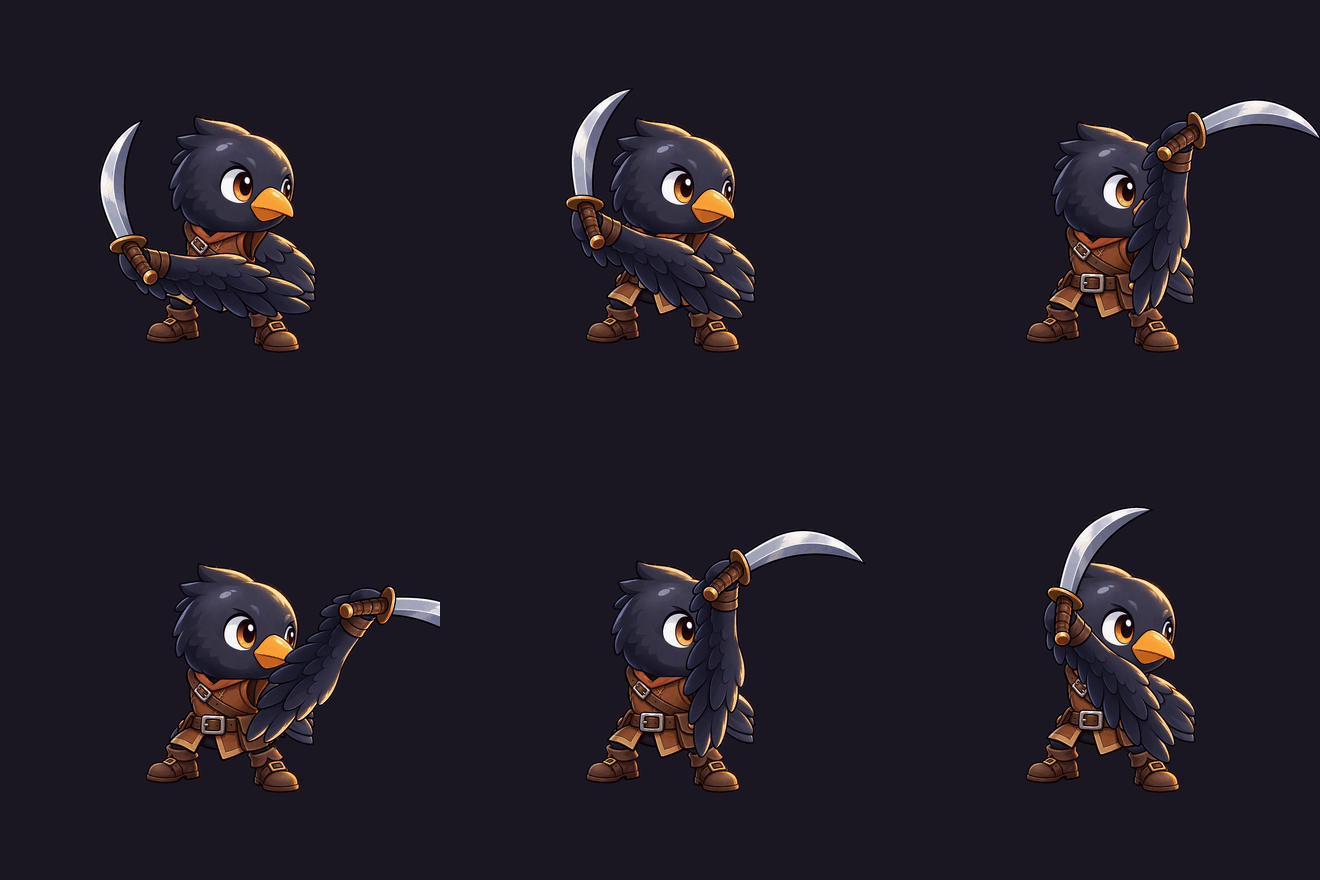
Eight frames. Zero generations. Every frame is the same pixels in a different place, so the drift is exactly zero. Here's the same rig on each model's layers - you can see GPT-Image-2's oversized head come along for the ride:
| Per 8-frame action | Generated | Rigged |
|---|---|---|
| Model calls | 7 | 0 |
| Setup | none | 7 calls, once per character |
| Head-size drift | up to 27.4% | 0% |
| Change it later | regenerate | change a number |
And the math flips the moment a character needs a second animation. Seven calls buys you the character forever, not just one action.
To be honest about the trade-off: rigid rotation is not animation. At the ends of the swing the wing looks like a stiff plank, the joint shows a seam, and there's no squash and stretch. The generated frames are more alive and less consistent. The rig is more consistent and less alive. A hand-placed pivot and a couple more joints would close some of that gap, without a single extra model call.
And the size of the move decides whether you get away with it. A breathing idle - the torso rising a few pixels, the head bobbing - looks genuinely good. The slash looks horrible: a plank on a hinge, swinging from wherever the model happened to pin the wing. Small moves hide a bad pivot. Big ones put it on screen.
Test 4: Give It a Screen, Ask for the Art
Three tests in, the rule was holding. So I tried the request I think most game devs actually have: here's what my game should look like - make me the assets.
One mock-up of a mobile sort puzzle: fruit mascots on a shelf, pop-it tokens on a board, a funnel full of balls, stacked trays, and a HUD.
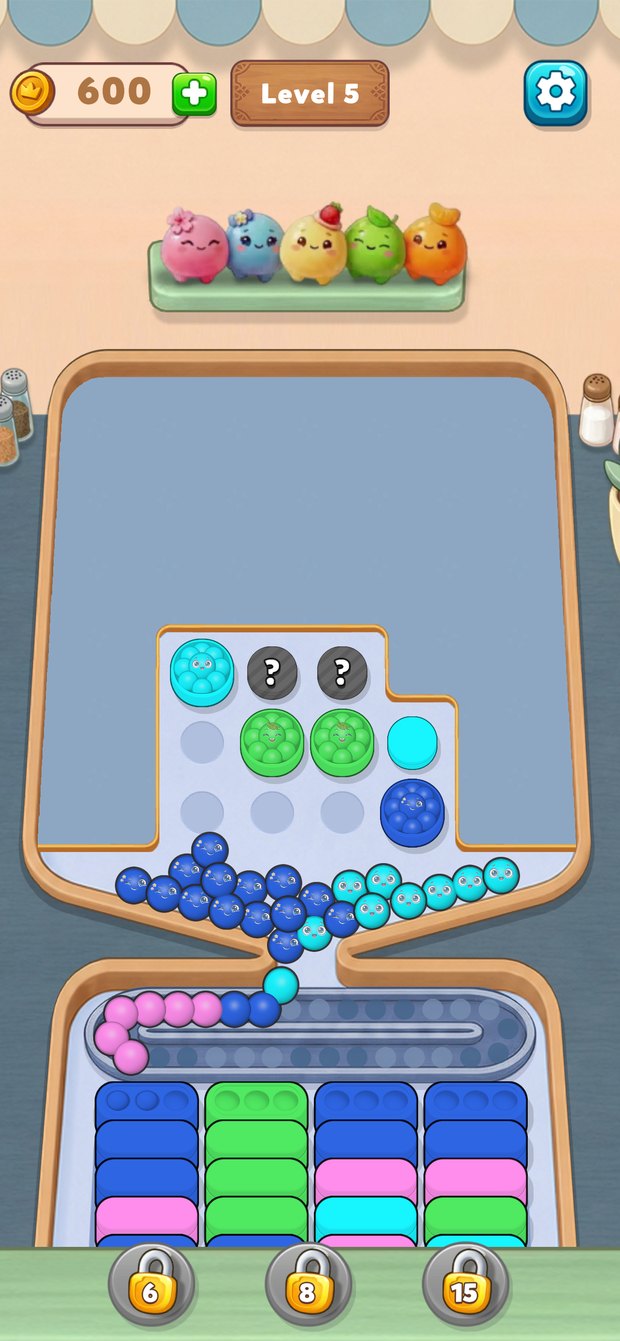
This time there's no base asset. The mock-up itself goes into the edits endpoint, and each call asks for one asset from it - "the pink mascot from the shelf", "the coin counter from the top-left" - alone, centred, transparent background, as close to the mock-up as possible.
20 assets, identical prompts, three models. 60 calls, about three minutes.
60 Out of 60
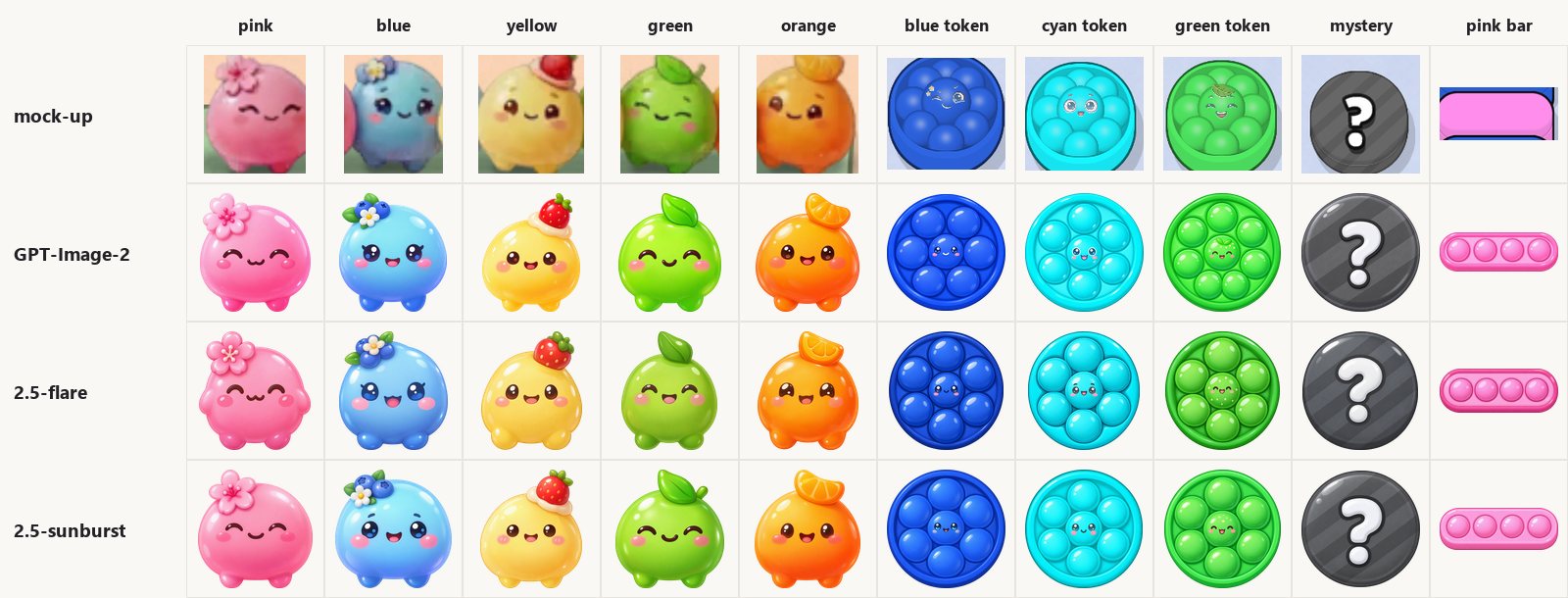
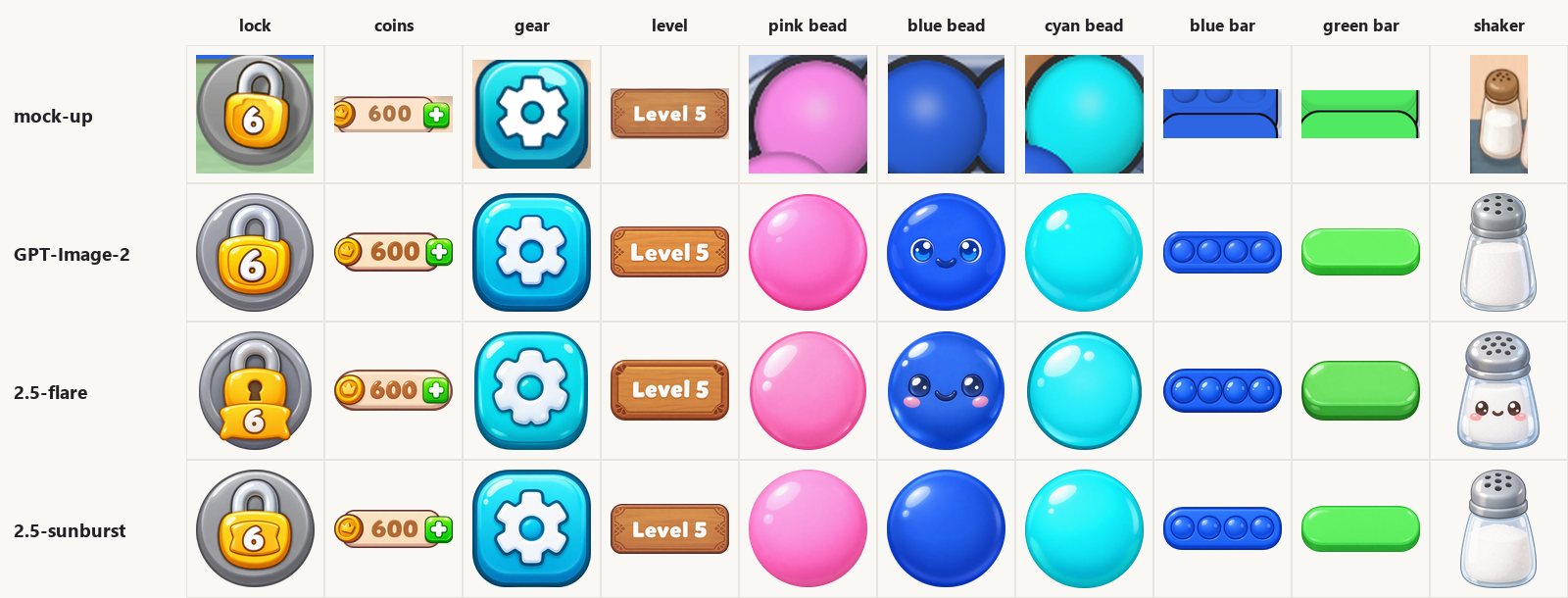
Every single one was usable. Same glossy shading, same round shapes, same colour family. Even the text - "600", "Level 5", the "6" on the lock - came out clean in all three.
Usable, and a little friendlier than asked. Nobody requested a face on anything, and the models handed them out anyway: every mascot came back with big anime eyes instead of the mock-up's small dots, the plain bead got a kawaii face despite "no face" in the prompt, and flare gave the salt shaker eyes and a smile. A salt shaker. It is funny once and a problem twice - across all 20 assets that is one unrequested face for GPT-Image-2, two for flare, and zero for sunburst.
What separates the models is something you never see in one image: does the set hold together? Five mascots on one shelf should be the same height.
| Across a set | GPT-Image-2 | 2.5-flare | 2.5-sunburst |
|---|---|---|---|
| Height spread, 5 mascots | 14.3% | 5.7% | 8.0% |
| Height spread, 3 beads | 3.2% | 1.3% | 0.4% |
| Height spread, 3 tray bars | 13.1% | 20.8% | 4.3% |
| "No face" followed, 3 beads | 2 of 3 | 2 of 3 | 3 of 3 |
Flare kept the characters most consistent. Sunburst kept the shapes most consistent and followed the instructions. GPT-Image-2 drew everything bigger and less consistently - nothing broken, everything a bit off.
The Mock-Up Beats the Prompt
Two things went wrong the same way in all three models, and a third in two of them.
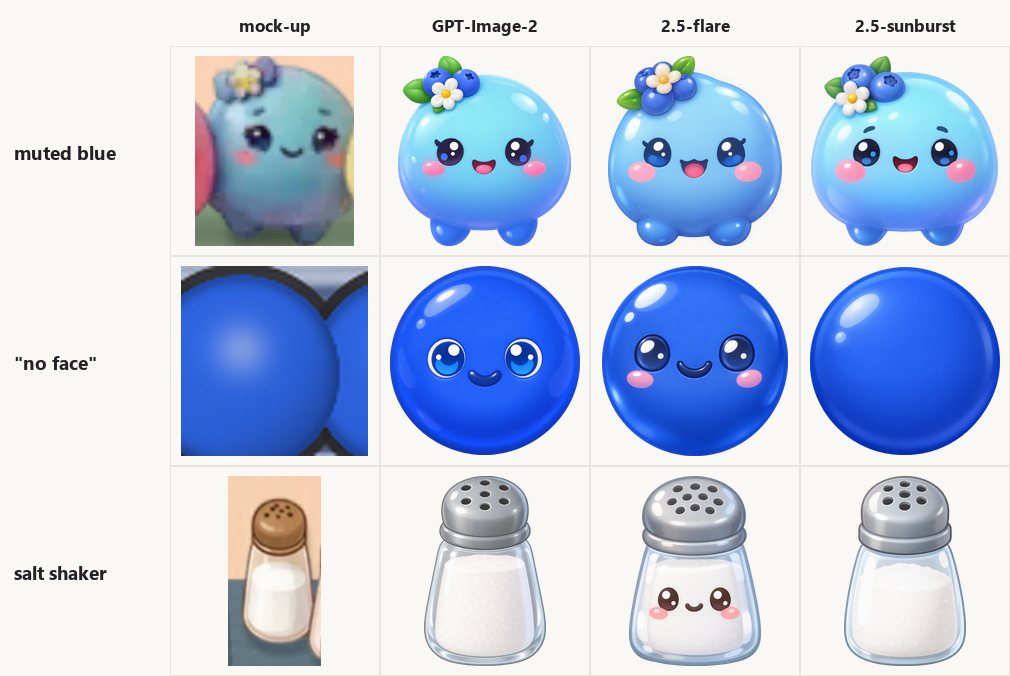
The blue mascot in the mock-up is a muted, dusty blue. All three models made it bright sky blue. And the small dot eyes turned into big anime eyes, in all three. That's the usual kind of prior - what a "cute blue blob" looks like in the training data.
The bead is a new kind. The beads in the tray are plain, so the prompt said no face. Two of three models drew a face anyway, and it's obvious why when you look at the mock-up: it's full of blue balls with faces. Flare even put a face on the salt shaker. Only sunburst stuck to the prompt.
So this time, the thing that beat my instruction wasn't only the training data. It was the picture I gave it.
Putting the Screen Back Together
A folder of nice assets doesn't prove much. Test 3 taught me the real check is putting the pieces back, so I did the same with the whole screen:
- I mapped every asset in the mock-up - 70 of them.
- I painted all 70 out of the mock-up. That's the background, and the "did nothing" baseline.
- I put each model's assets back in place, keeping their own proportions.
- I scored only the areas where assets sit, so the background can't make the number look better.
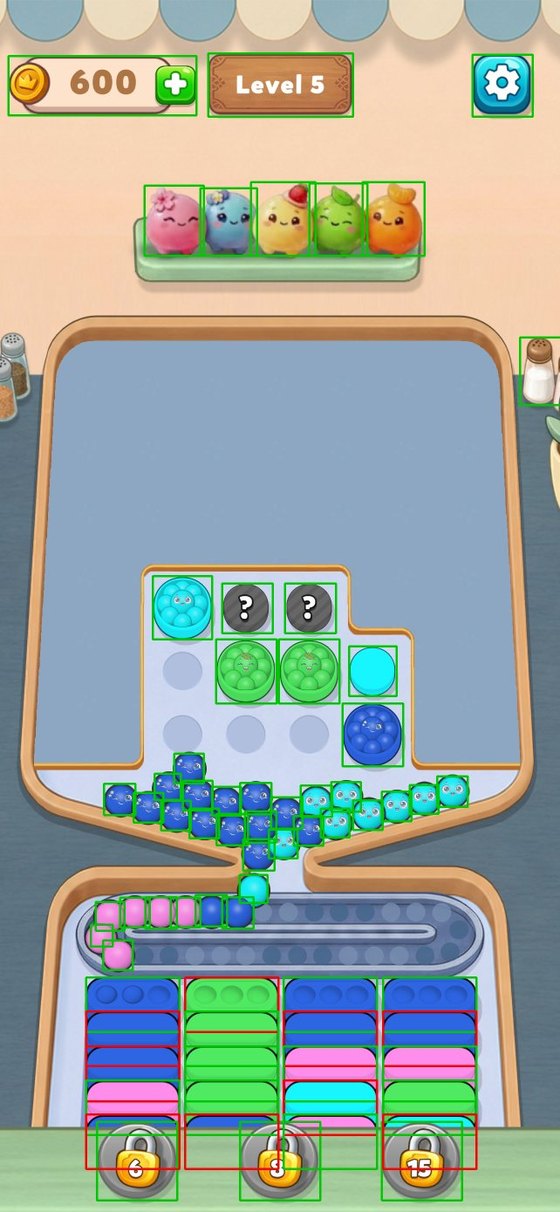
The first result came before any number: my asset list had holes. In the map above, green had an asset and red had nothing. Nine of the 20 tray bars had nothing - I never asked for flat blue, flat cyan or a green bar with bubbles. The pink bars had bubbles the mock-up doesn't have. The "8" and "15" locks didn't exist. The balls in the pile have faces, and I only had plain ones. And one mistake that's fully mine: I asked for four bubbles on the bars, and the mock-up has three.
You don't notice any of that while you look at assets one by one. You notice when something has nowhere to go. So I generated ten more assets per model, 30 more calls:
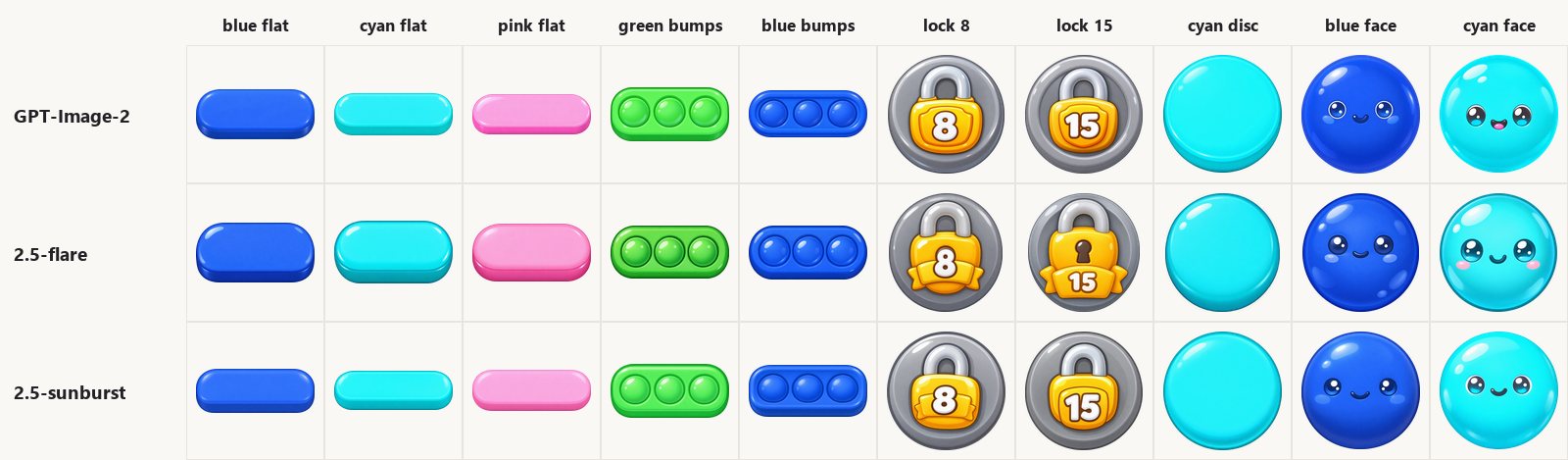
Then I rebuilt the screen:
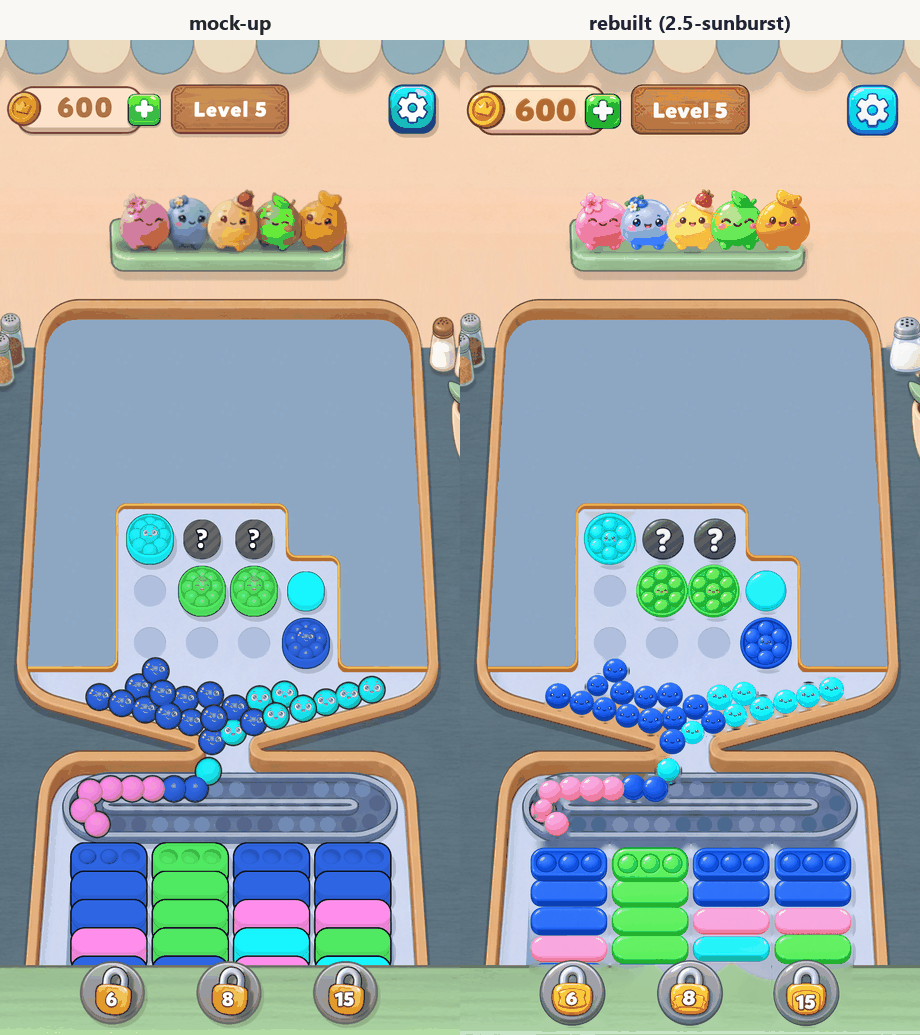
On a phone screen, that's the same level.
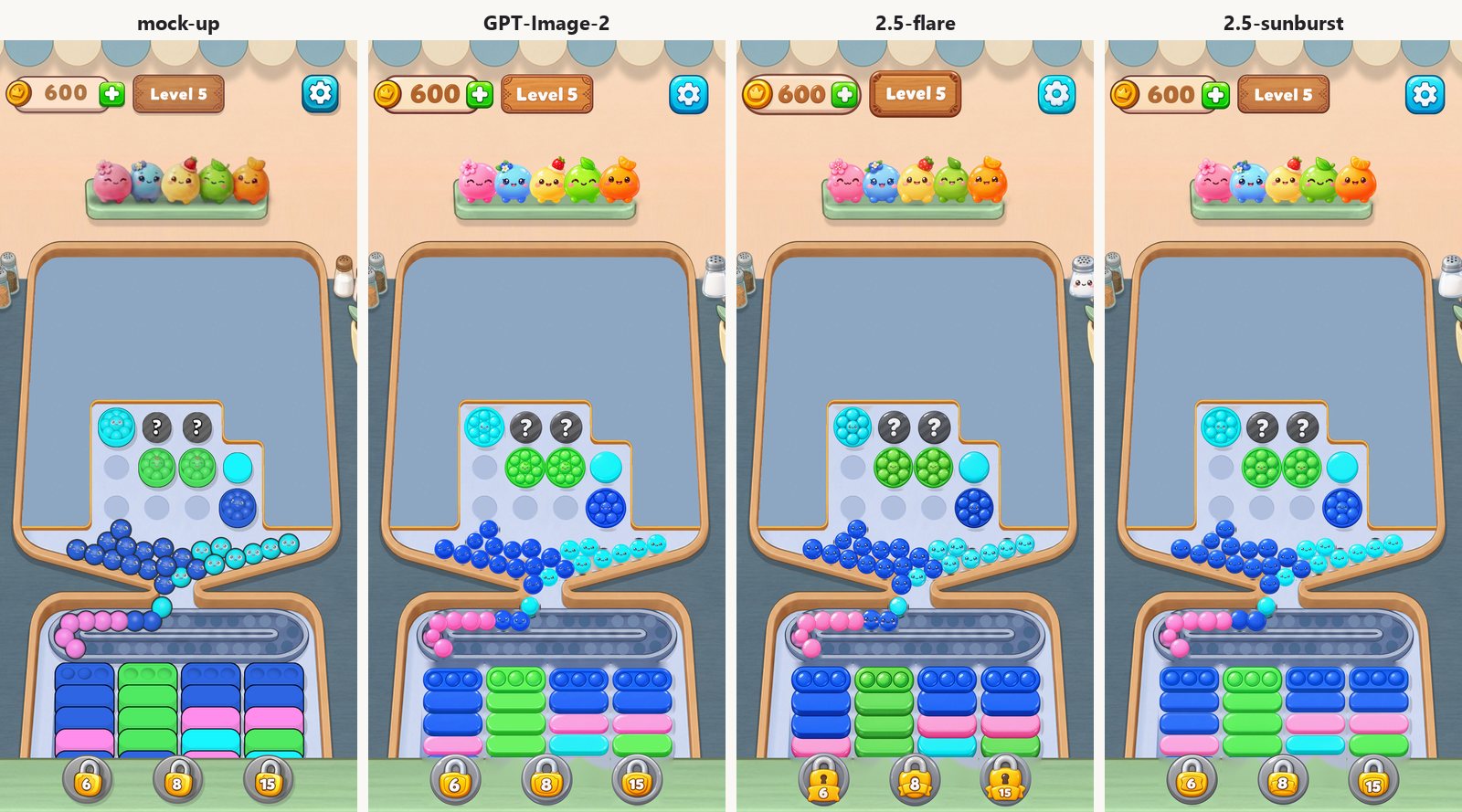
How Close Is Close?
Comparing pixels is brutal. Even a perfect copy of the mock-up, moved by 3 pixels, only scores 72.6% on my measure. So that's the real ceiling, and every number below should be read against it. The score is how much of the error goes away compared with leaving the spot empty.
| Score inside the asset spots | GPT-Image-2 | 2.5-flare | 2.5-sunburst | Perfect copy, 3 px off |
|---|---|---|---|---|
| All 70 assets | 47.3% | 42.3% | 49.4% | 72.6% |
| HUD | 51.2% | 42.1% | 53.4% | 65.9% |
| Board tokens | 59.1% | 56.1% | 60.1% | 74.2% |
| Balls in the pile | 51.8% | 54.4% | 53.0% | 68.6% |
| Tray bars | 47.1% | 40.4% | 48.9% | 78.7% |
| Mascots | 27.9% | 33.0% | 31.9% | 79.2% |
| Lock badges | 27.2% | 6.6% | 31.6% | 54.2% |
The best rebuild gets about two-thirds of the way to a perfect copy. The simple round things - HUD, tokens, balls - get about 80% of the way.
Where it falls short shows up in the error maps. Bright means wrong:
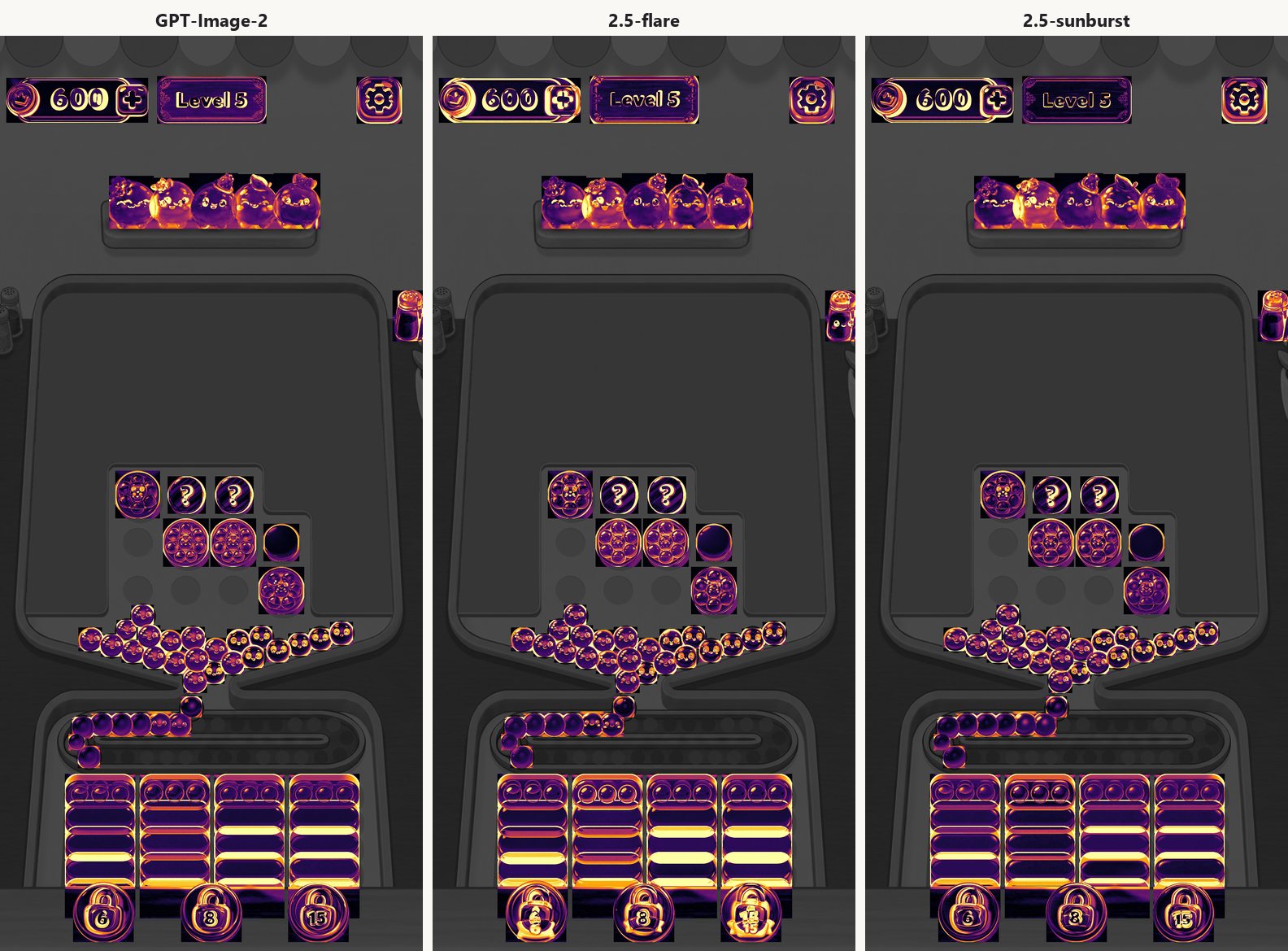
The mascots are bright all over - about 40% of the way. That's the same priors adding up: brighter colours, bigger eyes, each one a bit too big.
The trays are bright in stripes. The mock-up bars are tall stacked blocks, and every model drew a flat pill. To be fair to the models, my prompt literally said "seen slightly from above". So the seams between the rows light up:

Flare drew the thickest pills, the closest shape to the mock-up, and still scored the worst on trays. A closer outline doesn't make a stack. What I should have asked for is the whole tray column, or one bar at the mock-up's real camera angle.
The board tokens show the same pull without my help. In the mock-up they're cups seen at an angle, with a visible side. Their prompts didn't name an angle, and all three models drew them straight from above anyway.
And flare's locks scored 6.6%. It redesigned the padlock - keyhole, ribbon, sticking out of the badge - the same way on all three locks.
I Almost Published My Own Bug
My first rebuild said the trays were a disaster: 35%. I already had the explanation written.
Then I checked my own code. I had placed every bar at the bottom of its slot. Stacked bars only show their top edge, so every row sat about 30 pixels too low, and the whole bottom row was hidden under the panel. After the fix, the trays went to 49% and the overall score from 44% to 49%.
The explanation survived, just smaller. But the original number was my mistake, not the models'. Before you explain your worst result, check that it isn't your own bug.
The One Rule
Four tests, 153 generations, and it all comes down to one sentence:
These models draw a thing. They don't remember the sequence it belongs to.
| Coin spin | Crow slash | Crow layers | Game screen | |
|---|---|---|---|---|
| Each call asked for | a step in a rotation | a pose | a part | an asset from a mock-up |
| Can you draw it on its own? | no | yes | yes | yes |
| Result | failed, all 3 | worked, all 3 | worked, all 3 | worked, 60 of 60 |
A part is a thing. A pose is a thing. An asset is a thing. "Frame 3 of 8" is not.
Test 4 added a second sentence, and I think it matters most for anyone making game art from a reference:
What you give the model matters more than what you tell it.
Give it a screen full of faces, and two out of three models will give you faces, no matter what the prompt says.
What I'd Actually Do
Bring in an art director or an animator, and hand them the tools. That is the honest answer. None of this replaces the person who knows why a silhouette reads or why a swing needs anticipation - it changes what that person spends their day on. They stop drawing the eighth frame by hand and start directing the generation, judging the set, and fixing the ten percent that matters. A prompt is not an art direction, and a diff map is not an eye.
And use a real animation tool. My rig is a hundred lines of rotation around an estimated shoulder, which is why the slash reads like a plank. Spine - or any proper 2D skeletal tool - gives you weighted meshes, real joints, easing and secondary motion on the same layers the models cut for you. The generation step stays exactly as described below. The animation step belongs in software built for it.
The rest of what I would do:
For animation:
- Generate the character once. Pad the canvas first - every base I generated ran its sword off the edge, even when I asked for margin.
- Cut it into layers once. Seven calls per character.
- Animate by moving the layers. Every action after that is free, consistent, and easy to change.
- Keep generation for what it's good at - a new character, a new costume, a key pose. Not frame-by-frame motion.
- If you must generate frames, ask for poses, not steps in a sequence. Use symmetry when you have it, and line everything up to a landmark afterwards.
For a whole screen:
- List every asset before you start. Every colour, every state, every number on screen.
- One asset per call, with the mock-up as the reference. It holds the style better than any description I could write.
- Say the colours and the camera angle out loud. Muted colours come back bright, and everything comes back seen from above unless you say otherwise.
- Crop the reference if it's full of something you don't want. A "no" in the prompt loses to a screen full of the thing.
- Rebuild the screen before you trust the set. Every problem in test 4 was invisible one asset at a time.
Not Game-Ready Yet
Straight answer: none of the three models passed. Nothing in this post is a sprite I would drop into a real game today.
Every result here is a starting point, not a finished asset. Getting one frame to production quality is still worth about another ten prompts on its own - fix the hands, pull the colours back, re-cut a layer, line it up again - and then a pass by hand at the end. Multiply that by eight frames and the "free art" story falls apart.
It is getting better. A 2.5 model came out ahead on almost every measure I took, and the layer trick is good enough that I will keep using it. But better is not done. We are not there yet.
What I Still Don't Know
A lot. An endless list, and every test I run adds to it faster than it crosses anything off. That is the actual state of this: not a solved workflow, a thing you keep working at. The one thing I am sure of is the direction - each generation of these models is visibly better than the one before, and the gap between "nice picture" and "usable asset" keeps getting smaller.
One run per test. One coin, one crow, one rig plan, one mock-up. The model rankings moved in every test, which is exactly what you'd expect from one run with small gaps. Trust the patterns, not the order.
I haven't tried a hard character yet - a flowing cloak, hair over the face, overlapping armour. That's where I'd expect the layer cutting to break. I also never checked the hidden areas the models painted in behind the layers. The first time a layer moves far enough, we'll find out.
And the screen rebuild only covers the assets. The board, the wooden frame, the tray track, the shelf and the wall - three-quarters of the screen - were never generated. I also haven't tried the fixes the rebuild points to: slicing the tray as a whole column, cropping the reference for each asset, and naming the camera angle. That's next, and I'll share what I find.
If you run something like this and get different results, I really want to hear about it.
If you want to build games with AI this way - trying the tools on real projects, then checking honestly what actually worked - that's the mindset we teach. You're the director, not the typist: the AI generates, and you decide what's good enough. Check out our Vibe Coding course.
Images generated with GPT-Image-2, GPT-Image-2.5-flare and GPT-Image-2.5-sunburst on Azure. The measuring scripts and charts were built with the help of Claude Code - practicing what we preach.